This solution uses JsBarcode javascript library
For description of jsbarcode options see https://snyk.io/advisor/npm-package/jsbarcode
The following Barcode formats are supported in this js library
CODE128
CODE39
EAN / UPC EAN-13, EAN-8, EAN-5, EAN-2, UPC (A)
ITF ITF, ITF-14
MSI MSI, MSI10, MSI11, MSI1010, MSI1110
Pharmacode
Codabar
STEPS
- Download JsBarcode.all.min.js from https://lindell.me/JsBarcode/#download
- Upload the JsBarcode.all.min.js file into APEX using Shared Components ... using "Static Application Files" link
- In the page Javascript attributes on the page where the report is to be displayed add under
a) File URLs
#APP_IMAGES#JsBarcode.all.min.js //( if the js file was stored in the "Workspace" instead of the "Application" use the prefix #WORKSPACE_IMAGES#)
b) Execute when Page Loads
JsBarcode(".barcode").init();
- Create a new column in the report SQL on the ID that will be represented by the BARCODE. Replace '||spc_id||' below with the barcode number column name. Tweak options where appropriate.
select ....
'<svg class="barcode"
jsbarcode-format="code128"
jsbarcode-value= '||spc_id||'
jsbarcode-textmargin="0"
jsbarcode-fontoptions="bold"
jsbarcode-lineColor="#000"
jsbarcode-background="#ffffff"
jsbarcode-displayValue= true
jsbarcode-width= "1.5"
jsbarcode-height="18"
jsbarcode-fontSize= "12"
jsbarcode-marginTop= "9"
jsbarcode-marginBottom= "9"
jsbarcode-marginLeft= "2"
jsbarcode-marginRight= "2" >
</svg>'as barcode,
....
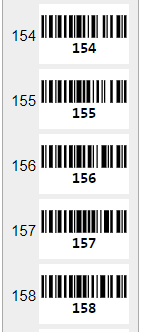
That's it! Good luck.
PaulP