Skip to Main Content

APEX

Announcement

For appeals, questions and feedback about Oracle Forums, please email oracle-forums-moderators_us@oracle.com. Technical questions should be asked in the appropriate category. Thank you!

How to customize the default Login Template for the Universal Theme V5.1

PPlattApr 12 2017 — edited Apr 17 2017

APEX V5.1

Universal theme 42

I'd like customize the Universal theme logon template to remove the following area to make the popup style page 101 much smaller. This includes removing any top padding, the space for the icon and the "Logon" header. What is the code I need to replace/add to do this in the template.?
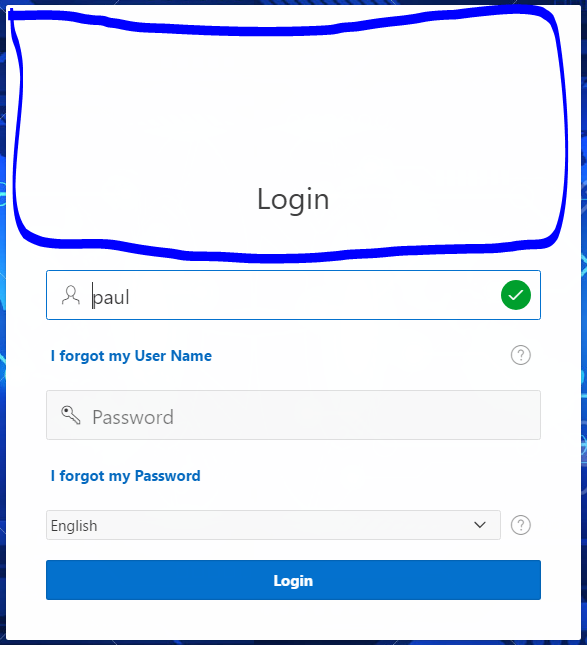
pastedImage_0.png

The only code exposed in the template is
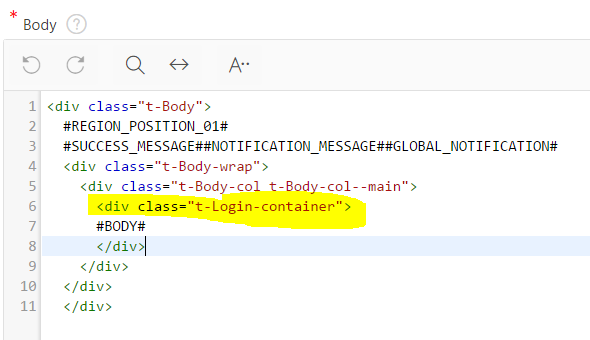
pastedImage_1.png

If I inspect the page in chrome I can see and access the <div>s that show the logo position and "Login" <h1>heading title but how do I disable this in the template code? Basically I want to remove the <div> before class="t-login-header"

pastedImage_2.png

thanks in advance

PaulP

This post has been answered by fac586 on Apr 13 2017
Jump to Answer
Comments
Locked Post
New comments cannot be posted to this locked post.
Post Details
Locked on May 15 2017
Added on Apr 12 2017
5 comments
1,236 views