Hello,
In my app I have in the IG an item of type Switch, which looks like:
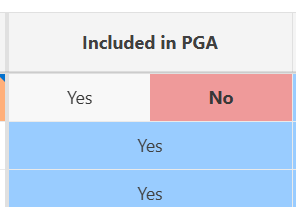
, so it can have 2 values, 1 for Yes, 0 for No.
I wanted to save in another hidden app item, a value of 1 when I do a change in that IG column, otherwise to store 0 in that item.
So whenever all the items have ‘Yes" let's say when the page is loaded, if I set at least one to “No", I want that app item to be 1.
It seems that comparison can't be done in that way, as below:
(function() {
 $('#myIG').on("interactivegridviewmodelcreate", function(jQueryEvent, data) {
     let model = data.model;
     model.subscribe({
         onChange: function(changeType, change) {
             if (changeType == 'set')
             {
                 if (change.field && change.field == "ACTIVE")
                 {
                     let myColumnValue = model.getRecordValue(change.recordId, "ACTIVE");
                     let myColumnOldValue = change.oldValue;
                     console.log(myColumnValue);
                        console.log(myColumnOldValue);
                    /* if myColumnValue != myColumnOldValue {
                        apex.item("P201_STORE_CHANGED").setValue(1);
                        console.log(myColumnValue);
                        console.log(myColumnOldValue);
                     }*/
                 }
             }
         }
     });
 });
})();
if myColumnValue != myColumnOldValue
this does not work.
When I change that ACTIVE column (item of Switch type), printing those 2 shows in console smth like:
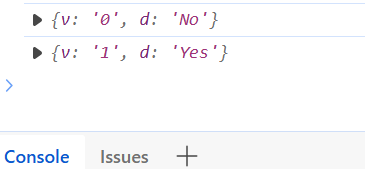
How can I compare the two if they are equal or not?
Thank you!