Hi. I have a page where a user has to upload some file. I have some javascript code that will check the size and extensions and that works fine. But I am not able to clear out the file from the control when there is an error.

When there is a error the message shows correctly
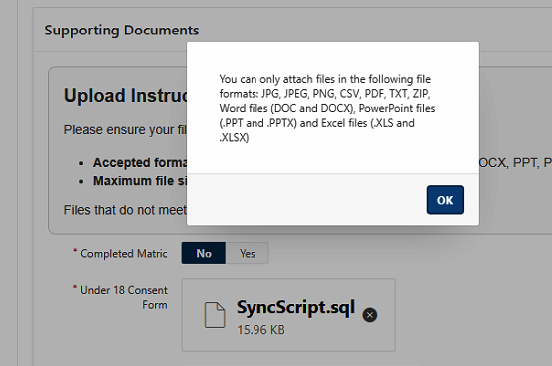
But the file name is still there even if I set the item to null

If I change the item to a Native File Browser then it will work fine

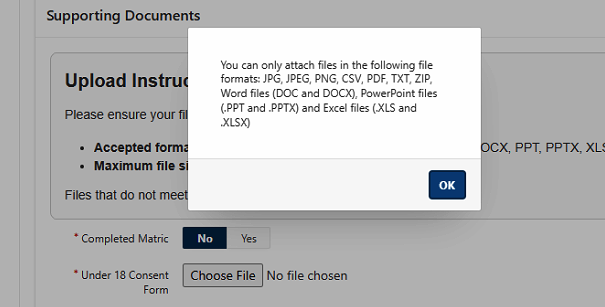
How can I get the same in the Dropzone control to clear out the file name if there is a error ?
ChatGPT gave me the code in Javascript to clear it out but it is not working.
function validateFileUnder(fileid) {
if (window.File && window.FileReader && window.FileList && window.Blob) {
var fileSize = 0;
var fileInput = $('#' + fileid)[0];
   `if (!fileInput || !fileInput.files || !fileInput.files[0]) {`
       `return true; // No file selected`
   `}`

   `fileSize = fileInput.files[0].size / 1048576; // MB`
   `var fileName = fileInput.files[0].name;`
   `var fileExtension = fileName.substr((fileName.lastIndexOf('.') + 1)).toUpperCase();`
   `var validExtList = 'JPG,JPEG,PNG,CSV,PDF,TXT,ZIP,DOC,DOCX,PPT,PPTX,XLS,XLSX';`
   `var fsizeMB = Math.round(fileSize * 100) / 100;`
   `var ferror = 0;`

   `if (fileName.length > 50) {`
       `apex.message.alert('The maximum limit for file name is 50 characters including extension.');`
       `ferror = 1;`
   `} else if (validExtList.search(fileExtension) == -1) {`
       `apex.message.alert('You can only attach files in the following file formats: JPG, JPEG, PNG, CSV, PDF, TXT, ZIP, Word files (DOC and DOCX), PowerPoint files (.PPT and .PPTX) and Excel files (.XLS and .XLSX)');`
       `ferror = 2;`
   `} else if (fsizeMB > 20) {`
       `apex.message.alert("You cannot upload a file greater than 20 MB. Your file size is " + fsizeMB + "MB.");`
       `ferror = 3;`
   `}`

   `if (ferror !== 0) {`
       `$s("P45_UNDER_FILE_ERROR", ferror);`

       `// ¿ Clear the Dropzone UI and file reference`
       `var dropzoneContainer = $('#' + fileid).closest('.a-FileDropzone');`
       `if (dropzoneContainer.length) {`
           `dropzoneContainer.removeClass('a-FileDropzone--hasFile');`
           `dropzoneContainer.find('.a-FileDropzone-filename').text('');`
           `dropzoneContainer.find('input[type="file"]').val(null);`
           `dropzoneContainer.find('.a-FileDropzone-removeFile').remove(); // optional`
       `}`

       `// Also clear the APEX item value (if applicable)`
       `if (typeof apex.item === 'function') {`
           `apex.item(fileid.replace('_FILE', '')).setValue('');`
       `}`

       `return false;`
   `}`

   `return true;`
} else {
// File API not supported, assume valid
return true;
}
}