I'm new to Oracle APEX (but have 20+ yrs as an Oracle Dev include Oracle Forms/Reports).
Currently running Oracle APEX 21.1, on Oracle Database 19c Enterprise Edition Release 19.0.0.0.0 - Production
In my APEX page, I have a region of strictly buttons.
One of the buttons which has the “WHEN” attributes set to “Event - Click”, “Selection Type - Button”, “Button - My Button”
and also has 2 DAs (Dynamic Actions)
- Execute Server-side Code (which populates hidden items based on a select into query
- Alert
- Title - My Title
- Message - My message
- Style - Information
- Icon - fa-address-card
- CSS Classes - empty
- OK Label - Close
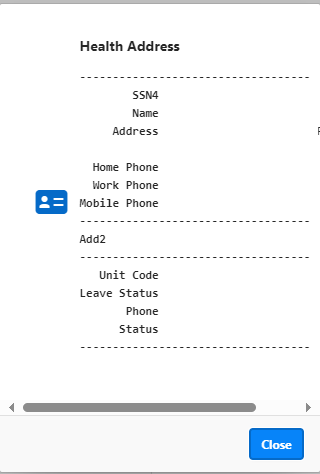
My question is, how do I set the height and/or width of this Alert? When it runs everything works great, except that it now shows the text that is long on some lines, thus producing a horizontal scrollbar at the bottom so to see the rest of the text
I've attached the image below. is it possible to customize width to avoid scroll bar or make it so that it's dynamically flexible based on the text?
Thanks,