Hi
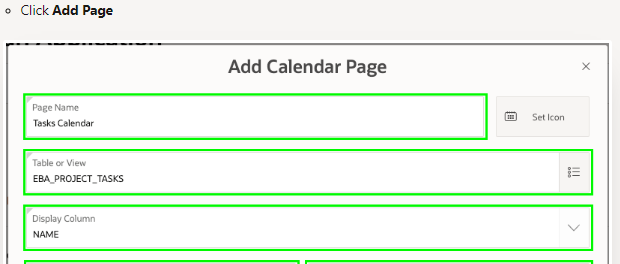
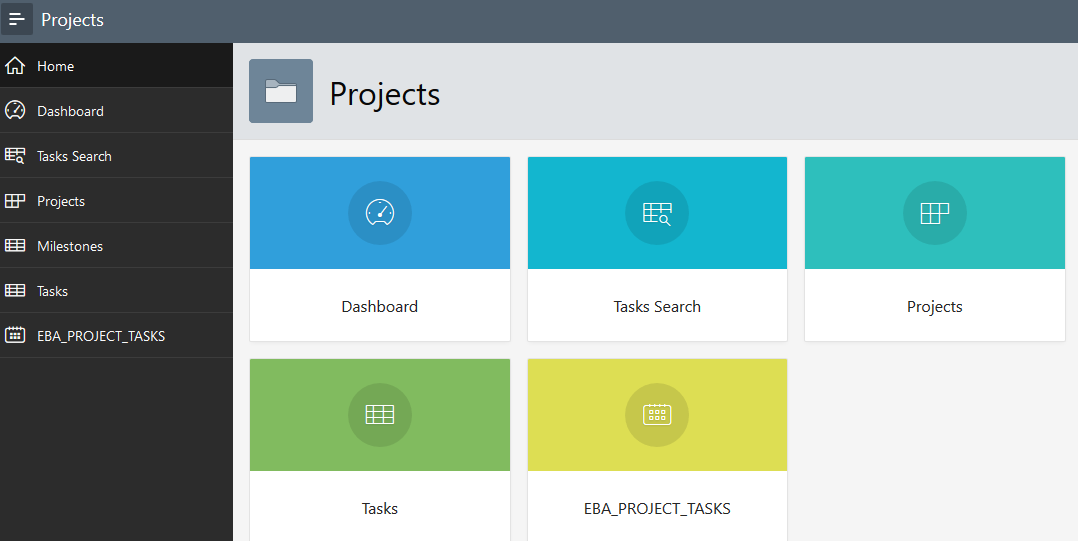
I was practicing the Apex Tutorials, I did not set the Page Name correctly. e.g. I did not set the Page Name to "Tasks Calendar" hence in Home page the Page is showing as EBA_PROJECT_TASKS.
Is there a way to correct this from App Builder. I have visited Page 9 and changed the Name and Title in the Identification section to Tasks Calendar but this has not been effective.
PS: When I do an export, I found
wwv_flow_api.create_list_item(
p_id=>wwv_flow_api.id(28636900101866931266)
,p_list_item_display_sequence=>70
,p_list_item_link_text=>'EBA_PROJECT_TASKS'
.....
wwv_flow_api.create_menu_option(
p_id=>wwv_flow_api.id(28636901762481931269)
,p_short_name=>'EBA_PROJECT_TASKS'
.....
wwv_flow_api.create_page_plug(
p_id=>wwv_flow_api.id(28636900870963931268)
,p_plug_name=>'EBA_PROJECT_TASKS'
,p_region_template_options=>'#DEFAULT#'
etc
If I edit these values and import back it might work but is there a simple way?
Regards
Sanjay