Hello.
create table 거래(
    거래id number(10) primary key,
    고객id number(10),
    거래일자 date,
    결제일자 date
);

create index 거래_idx11 on 거래(고객id, 거래일자);
create index 거래_idx22 on 거래(고객id, 결제일자);

explain plan for
select /*+ use_concat no_batch_table_access_by_rowid(거래)
           index(거래@sel$1 거래_idx22) index(거래@sel$1_2 거래_idx11) */ * from 거래
where 고객id = :cust_id
and (
    (:dt_type = 'A' and 거래일자 between :dt1 and :dt2)
    or
    (:dt_type = 'B' and 결제일자 between :dt1 and :dt2)
);

select * from table(dbms_xplan.display(format => 'advanced'));
In sql developer, for non-english(Korean) column shown for execution plan, its value is chopped:
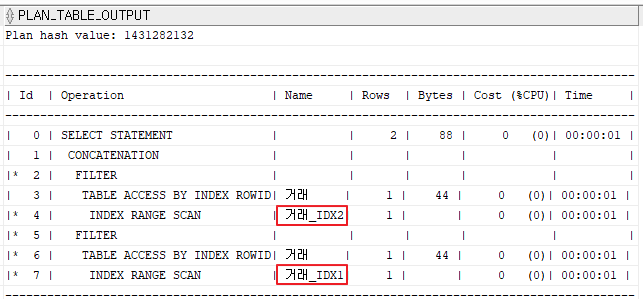
The “거래_IDX2” and “거래_IDX1” should be “거래_IDX22” and “거래_IDX11” respectively.
This problem happens in SQL*Plus too.
In the Powershell used to execute SQL*PLUS, the encoding is set to ‘CHCP 949’.
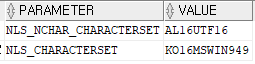
Also, database character set is
Thanks.