Hi, I am working creating PL-SQL procedures and functions to upload data from non-structured sources to NetSuite, and after some trouble regarding MultiTenant Architecture and some string functions, I am on my way to achieve the goal, to transform the non-structured data into structured data readable for NetSuite.
There are still some other administrative tasks that I must accomplish in order to protect these development efforts and artifacts.
To do the back-up, and according to the SQL Developer 20.2 documentation, in the DBA panel, with the SYS user? I must right click on RMAN Backup/Recovery, and SQL Dev generates the following file content:
-----------------------------------------------------------------------------------------------------------------------
SHUTDOWN IMMEDIATE;
STARTUP MOUNT;
RUN {
ALLOCATE CHANNEL SQLDEV_DISK_BACKUP DEVICE TYPE DISK;
RECOVER COPY OF DATABASE WITH TAG 'ORA_SQLDEV_LEVEL_0';
BACKUP INCREMENTAL LEVEL 1 CUMULATIVE COPIES=1 FOR RECOVER OF COPY WITH TAG 'ORA_SQLDEV_LEVEL_0' DATABASE;
}
ALTER DATABASE OPEN;
-----------------------------------------------------------------------------------------------------------------------
Once the script is generated, in SQL Developer a dialog pops up:
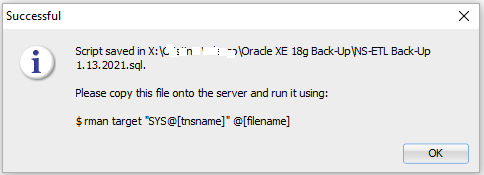
Note: I deleted the directory name above to keep my client information confidential.
Could you please let me know how can I run this script? I did try in SQLPlus, user SYS as SYSDBA but it didn't work.
Regarding users, with the user SYS I created a user called KHRISTINE who is the owner of the tables, indexes, sequence, procedures, functions, data model, etc I have developed; it's very important to backup the Khristine's schema because all these artifacts plus the software are now in production.
Which user is the right one to run the Backup process.
Thanks a lot in advance for your help,
Khistine