Hello Experts,
I am trying to run Forms [32 Bit] Version 10.1.2.0.2 (Production)
On OS Windows 8.1 64 bit
On IE 11 32bit C:\Program Files\Internet Explorer\iexplore.exe
Using Java Plug-in 1.6.0_45
On Oracle database 11G R2
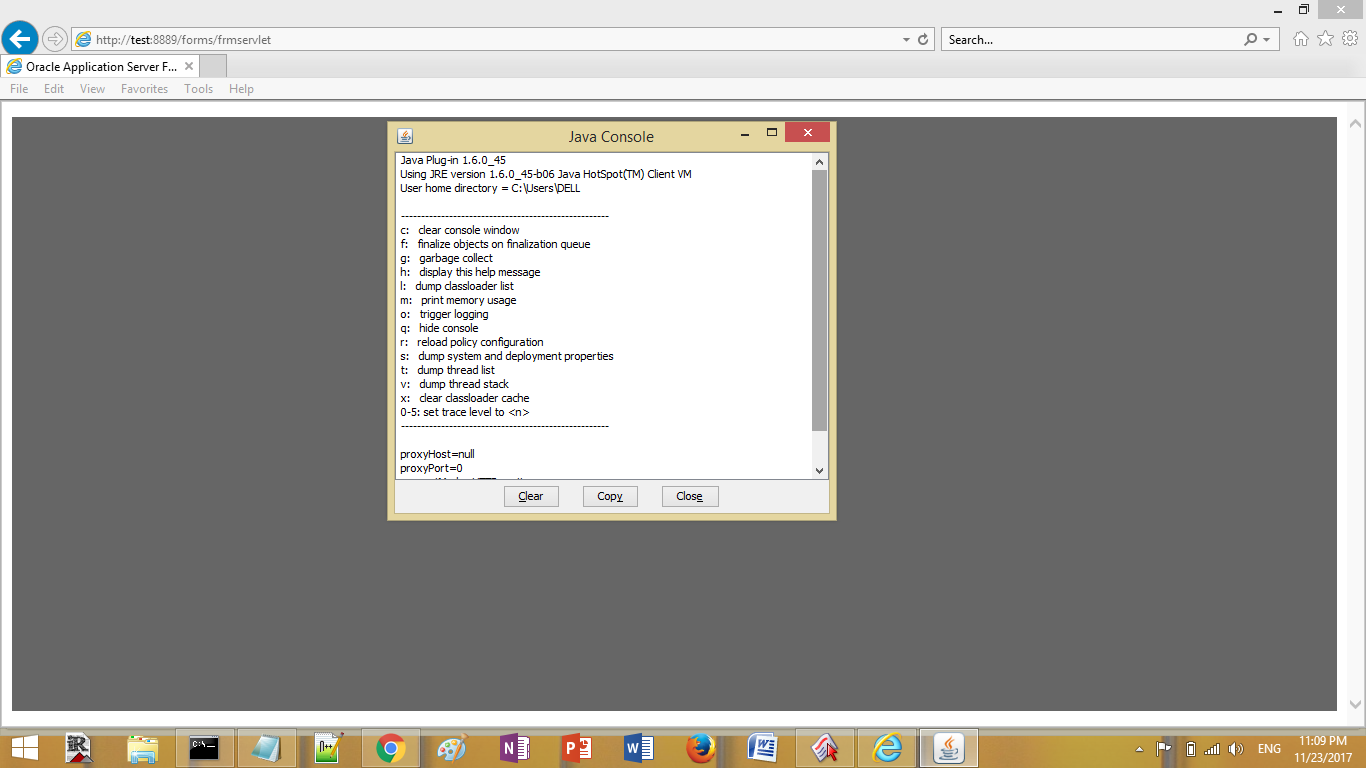
Every thing runs fine asks me to enter user name & Password then No response. Forms Crashed as you see>>>
Any help is highly appreciated>
Here is my Formsweb.cfg file:
# $Id: formsweb.cfg 15-apr-2005.13:17:30 pkuhn Exp $
# formsweb.cfg defines parameter values used by the FormsServlet (frmservlet)
# This section defines the Default settings. Any of them may be overridden in the
# following Named Configuration sections. If they are not overridden, then the
# values here will be used.
# The default settings comprise two types of parameters: System parameters,
# which cannot be overridden in the URL, and User Parameters, which can.
# Parameters which are not marked as System parameters are User parameters.
# SYSTEM PARAMETERS
# -----------------
# These have fixed names and give information required by the Forms
# Servlet in order to function. They cannot be specified in the URL query
# string. But they can be overridden in a named configuration (see below).
# Some parameters specify file names: if the full path is not given,
# they are assumed to be in the same directory as this file. If a path
# is given, then it should be a physical path, not a URL.
# USER PARAMETERS
# ---------------
# These match variables (e.g. %form%) in the baseHTML file. Their values
# may be overridden by specifying them in the URL query string
# (e.g. "http://myhost.mydomain.com/forms/frmservlet?form=myform&width=700")
# or by overriding them in a specific, named configuration (see below)
[default]
# System parameter: default base HTML file
## Original Setting
#baseHTMLjinitiator=basejini.htm
## New Setting
baseHTMLjinitiator=basejpi.htm
# System parameter: base HTML file for use with JInitiator client
baseHTMLjinitiator=basejpi.htm
# System parameter: base HTML file for use with Sun's Java Plug-In
baseHTMLjpi=basejpi.htm
# System parameter: delimiter for parameters in the base HTML files
HTMLdelimiter=%
# System parameter: working directory for Forms runtime processes
# WorkingDirectory defaults to <oracle_home>/forms if unset.
workingDirectory=
# System parameter: file setting environment variables for the Forms runtime processes
envFile=default.env
# Forms runtime argument: whether to escape certain special characters
# in values extracted from the URL for other runtime arguments
escapeparams=true
# Forms runtime argument: which form module to run
form=test.fmx
# Forms runtime argument: database connection details
userid=
# Forms runtime argument: whether to run in debug mode
debug=no
# Forms runtime argument: host for debugging
host=
# Forms runtime argument: port for debugging
port=
# Other Forms runtime arguments: grouped together as one parameter.
# These settings support running and debugging a form from the Builder:
otherparams=buffer_records=%buffer% debug_messages=%debug_messages% array=%array% obr=%obr% query_only=%query_only% quiet=%quiet% render=%render% record=%record% tracegroup=%tracegroup% log=%log% term=%term%
# Sub argument for otherparams
buffer=no
# Sub argument for otherparams
debug_messages=no
# Sub argument for otherparams
array=no
# Sub argument for otherparams
obr=no
# Sub argument for otherparams
query_only=no
# Sub argument for otherparams
quiet=yes
# Sub argument for otherparams
render=no
# Sub argument for otherparams
record=
# Sub argument for otherparams
tracegroup=
# Sub argument for otherparams
log=
# Sub argument for otherparams
term=
# HTML page title
pageTitle=Oracle Application Server Forms Services
# HTML attributes for the BODY tag
HTMLbodyAttrs=
# HTML to add before the form
HTMLbeforeForm=
# HTML to add after the form
HTMLafterForm=
# Forms applet parameter: URL path to Forms ListenerServlet
serverURL=/forms/lservlet
# Forms applet parameter
codebase=/forms/java
# Forms applet parameter
imageBase=DocumentBase
# Forms applet parameter
width=100%
# Forms applet parameter
height=100%
# Forms applet parameter
separateFrame=false
# Forms applet parameter
splashScreen=
# Forms applet parameter
background=
# Forms applet parameter
lookAndFeel=Oracle
# Forms applet parameter
colorScheme=teal
# Forms applet parameter
logo=
# Forms applet parameter
restrictedURLparams=HTMLbodyAttrs,HTMLbeforeForm,pageTitle,HTMLafterForm,log,allow_debug,allowNewConnections
# Forms applet parameter
formsMessageListener=
# Forms applet parameter
recordFileName=
# Forms applet parameter
serverApp=default
# Forms applet archive setting for JInitiator
archive_jini=frmall_jinit.jar
# Forms applet archive setting for other clients (Sun Java Plugin, Appletviewer, etc)
archive=frmall.jar
# Number of times client should retry if a network failure occurs. You should
# only change this after reading the documentation.
networkRetries=0
# Page displayed to Netscape users to allow them to download Oracle JInitiator.
# Oracle JInitiator is used with Windows clients.
# If you create your own page, you should set this parameter to point to it.
jinit_download_page=/forms/jinitiator/us/jinit_download.htm
# Parameter related to the version of JInitiator
jinit_classid=clsid:CAFECAFE-0013-0001-0022-ABCDEFABCDEF
# Parameter related to the version of JInitiator
jinit_exename=jinit.exe#Version=1,3,1,22
# Parameter related to the version of JInitiator
jinit_mimetype=application/x-jinit-applet;version=1.3.1.22
# Page displayed to users to allow them to download Sun's Java Plugin.
# Sun's Java Plugin is typically used for non-Windows clients.
# (NOTE: you should check this page and possibly change the settings)
##jpi_download_page=http://java.sun.com/products/archive/j2se/1.6.0_45/index.html
# Parameter related to the version of the Java Plugin
## Original
#jpi_classid=clsid:CAFEEFAC-0014-0002-0006-ABCDEFFEDCBA
## New
jpi_classid=clsid:CAFEEFAC-0016-0000-0045-ABCDEFFEDCBA
# Parameter related to the version of the Java Plugin
##jpi_codebase=http://java.sun.com/products/plugin/autodl/jinstall-1.6.0_45-windows-i586.cab#Version=1.6.0_45
## Original
#jpi_mimetype=application/x-java-applet;jpi-version=1.4.2_06
## New
jpi_mimetype=application/x-java-applet;jpi-version=1.6.0_45
#following setting is for Firefox.
#jpi_mimetype=application/x-java-applet
# EM config parameter
# Set this to "1" to enable Enterprise Manager to track Forms processes
em_mode=0
# Single Sign-On OID configuration parameter
oid_formsid=%OID_FORMSID%
# Single Sign-On OID configuration parameter
oracle_home=E:\DevSuiteHomeOct
# Single Sign-On OID configuration parameter
formsid_group_dn=%GROUP_DN%
# Single Sign-On OID configuration parameter: indicates whether we allow
# dynamic resource creation if the resource is not yet created in the OID.
ssoDynamicResourceCreate=true
# Single Sign-On parameter: URL to redirect to if ssoDynamicResourceCreate=false
ssoErrorUrl=
# Single Sign-On parameter: Cancel URL for the dynamic resource creation DAS page.
ssoCancelUrl=
# Single Sign-On parameter: indicates whether the url is protected in which
# case mod_osso will be given control for authentication or continue in
# the FormsServlet if not. It is false by default. Set it to true in an
# application-specific section to enable Single Sign-On for that application.
ssoMode=false
# The parameter allow_debug determines whether debugging is permitted.
# Administrators should set allow_debug to "true" if servlet
# debugging is required, or to provide access to the Forms Trace Xlate utility.
# Otherwise these activities will not be allowed (for security reasons).
allow_debug=false
# Parameter which determines whether new Forms sessions are allowed.
# This is also read by the Forms EM Overview page to show the
# current Forms status.
allowNewConnections=true
# EndUserMonitoring
# EndUserMonitoringEnabled parameter
# Indicates whether EUM/Chronos integration is enabled
EndUserMonitoringEnabled=
# EndUserMonitoringURL
# indicates where to record EUM/Chronos data
EndUserMonitoringURL=
# Example Named Configuration Section
# Example 1: configuration to run forms in a separate browser window with
# "generic" look and feel (include "config=sepwin" in the URL)
# You may define your own specific, named configurations (sets of parameters)
# by adding special sections as illustrated in the following examples.
# Note that you need only specify the parameters you want to change. The
# default values (defined above) will be used for all other parameters.
# Use of a specific configuration can be requested by including the text
# "config=<your_config_name>" in the query string of the URL used to run
# a form. For example, to use the sepwin configuration, your could issue
# a URL like "http://myhost.mydomain.com/forms/frmservlet?config=sepwin".
[sepwin]
separateFrame=True
lookandfeel=Generic
# Example Named Configuration Section
# Example 2: configuration forcing use of the Java Plugin in all cases (even if
# the client browser is on Windows)
[jpi]
baseHTMLJInitiator=basejpi.htm
# Example Named Configuration Section
# Example 3: configuration running the Forms ListenerServlet in debug mode
# (debug messages will be written to the servlet engine's log file).
[debug]
serverURL=/forms/lservlet/debug
# Sample configuration for deploying WebUtil. Note that WebUtil is shipped with
# DS but not AS and is also available for download from OTN.
[webutil]
WebUtilArchive=frmwebutil.jar,jacob.jar
WebUtilLogging=off
WebUtilLoggingDetail=normal
WebUtilErrorMode=Alert
WebUtilDispatchMonitorInterval=5
WebUtilTrustInternal=true
WebUtilMaxTransferSize=16384
baseHTMLjinitiator=webutiljini.htm
baseHTMLjpi=webutiljpi.htm
archive_jini=frmall_jinit.jar
archive=frmall.jar
lookAndFeel=oracle
Oracle Database 11G 2