I am trying to install But getting error ... u can see error in the Snap shot
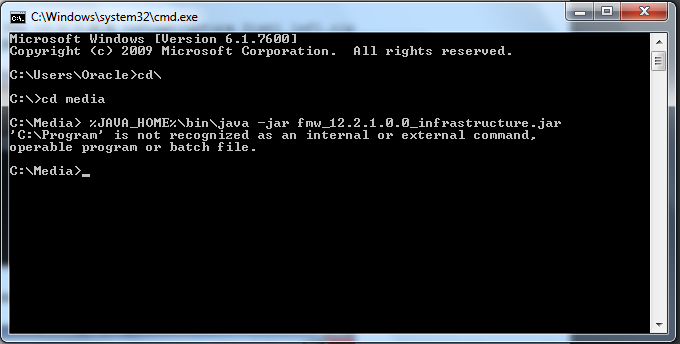
1) I installed "Java Jdk"
2) I Create directory c:\temp
3) Then I Change default temp location to the
c:\temp Control Panel -> System -> Advanced system settings -> Environment Variables
Edit both TEMP and TMP and change the value to c:\temp
4) after that I Navigate to “c:\program files\java”
Copy “c:\program files\java\jdk1.8.0_65” to “c:\app\oracle” and rename the folder name to jdk.
5) then i Add the environment variable “JAVA_HOME” Control Panel -> System -> Advanced system settings -> Environment Variables Click “New” on the System variables.
I Enter “JAVA_HOME” in the variable name, and “c:\app\oracle\jdk” in the variable value and click “OK”
6)Find the system environment “Path” and click “Edit” Add “c:\app\oracle\jdk\bin;” to the beginning of variable value.
7) then i unzip fmw_12.2.1.0.0_infrastructure_Disk1_1of1.zip
then i open CMD with administrator .... and try to run but getting error ... these are my pathes
1)C:\Media\fmw_12.2.1.1.0_infrastructure.jar
2)C:\Program Files\Java\jdk1.8.0_101
3C:\app\Oracle2\jdk