Hi All.
I have a series of issues using CustomColorScheme in Forms 12c when starting the application from Javawebstart.
Previous setting in Registry.dat:
colorScheme.Alfa.description=Alfa color scheme
colorScheme.Alfa.lightest=0xF7EBF7
colorScheme.Alfa.lighter=0xEAC5EA
colorScheme.Alfa.light=0xDDA0DD
colorScheme.Alfa.dark=0xC867C8
colorScheme.Alfa.darker=0xA73CA7
colorScheme.Alfa.darkest=0x5C215C
colorScheme.Alfa.selection=0xD68DD6
colorScheme.Alfa.pinstripe1=0x106E10
colorScheme.Alfa.pinstripe2=0x1BB01B
Actual setting:
# Alfa custom color scheme
colorScheme.Alfa.description=Alfa color scheme
colorScheme.Alfa.lightest=255,255,255
colorScheme.Alfa.lighter=150, 240, 125
colorScheme.Alfa.light=190, 180, 170
colorScheme.Alfa.dark=185, 255, 125
colorScheme.Alfa.darker=0, 125, 0
colorScheme.Alfa.darkest=0, 145, 0
colorScheme.Alfa.selection=170, 195, 255
colorScheme.Alfa.pinstripe1=255, 100, 0
colorScheme.Alfa.pinstripe2=255, 215, 187
Values in my jnlp file used to start the application:
<jnlp spec="1.0" codebase="http://192.168.16.247:7777/forms/java/">
<information>
\<title>Oracle Forms Services\</title>

\<vendor>Oracle Corporation\</vendor>

\<homepage href="[http://www.oracle.com](http://www.oracle.com)"/>

\<description>Oracle Forms Services with WebUtil applet launcher.\</description>

\<description kind="short">Oracle Forms Applet with WebUtil\</description>
</information>
<security>
\<all-permissions/>
</security>
<update check="always" policy="prompt-run"/>
<resources>
\<java href="[http://java.sun.com/products/autodl/j2se](http://java.sun.com/products/autodl/j2se)" version="1.7+"/>

\<javafx-runtime version="2.2+"/>

\<jar href="[http://192.168.16.247:7777/forms/java/frmall.jar](http://192.168.16.247:7777/forms/java/frmall.jar)" download="eager" main="true"/>

\<jar href="[http://192.168.16.247:7777/forms/java/frmwebutil.jar](http://192.168.16.247:7777/forms/java/frmwebutil.jar)" download="lazy" main="false"/>

\<extension href="[http://192.168.16.247:7777/forms/java/extensions.jnlp](http://192.168.16.247:7777/forms/java/extensions.jnlp)" name="Extensions"/>
</resources>
<applet-desc name="Oracle Forms" main-class="oracle.forms.engine.Main" width="1" height="1">
\<param name="width" value="95%"/>

\<param name="recordFileName" value=""/>

\<param name="height" value="90%"/>

\<param name="disableMDIScrollbars" value=""/>

\<param name="digitSubstitution" value="context"/>

\<param name="heartBeat" value=""/>

\<param name="WebUtilErrormode" value="Alert"/>

\<param name="ssoLogoutRedirect" value=""/>

\<param name="ssoLogout" value="false"/>

\<param name="EndUserMonitoringEnabled" value="false"/>

\<param name="WebUtilTrustInternal" value="true"/>

\<param name="logoutTargetURLParamname" value=""/>

\<param name="JavaScriptBlocksHeartBeat" value="false"/>

\<param name="imageBase" value="codebase"/>

\<param name="idleTimeout" value=""/>

\<param name="ssoMode" value="false"/>

\<param name="customColorScheme" value=""/>

\<param name="WebUtilDispatchMonitorInterval" value="5"/>

**\<param name="colorScheme" value="Alfa"/>**

\<param name="disableValidateClipboard" value="false"/>

\<param name="lookAndFeel" value="Oracle"/>

\<param name="separateFrame" value="false"/>

\<param name="WebUtilLoggingDetail" value="normal"/>

\<param name="mediaBase" value="codebase"/>

\<param name="webstartRequest" value="true"/>

\<param name="networkRetries" value="0"/>

\<param name="formsMessageListener" value=""/>

\<param name="allowAlertClipboard" value="true"/>

\<param name="splashScreen" value=""/>

\<param name="MaxEventWait" value=""/>

\<param name="logo" value=""/>

\<param name="background" value=""/>

\<param name="applet\_stop\_timeout" value="800"/>

\<param name="clientDPI" value=""/>

\<param name="serverURL" value="/forms/lservlet?ifcfs=/forms/frmservlet?config=ws\_webfigo&ifsessid=&acceptLanguage=en-US,en;q=0.5"/>

\<param name="WebUtilLogging" value="off"/>

\<param name="enableJavascriptEvent" value="true"/>

\<param name="WebUtilMaxTransferSize" value="16384"/>

\<param name="highContrast" value="false"/>

\<param name="serverApp" value=""/>

\<param name="guiMode" value="0"/>

\<param name="legacy\_lifecycle" value="false"/>

\<param name="EndUserMonitoringURL" value=""/>
</applet-desc>
</jnlp>
Problem Description:
When i start the application, it is not picking the actual values. So my question is:
-
Can rgb be used to define your custom color scheme? According to documentation it can:"Color values can either be hexadecimal (e.g. 0xFFFFFF) or RGB sets (e.g. 255,255,255)."
-
Why isn't the new configuration taken? is seems it is cached somewhere, but where? i have restarted WLS, clean JRE cache, but nothing seems to work.
-
Are the values from JNLP file override what is on formsweb.cfg config section? For example, modifying custom color scheme.
Screenshot:
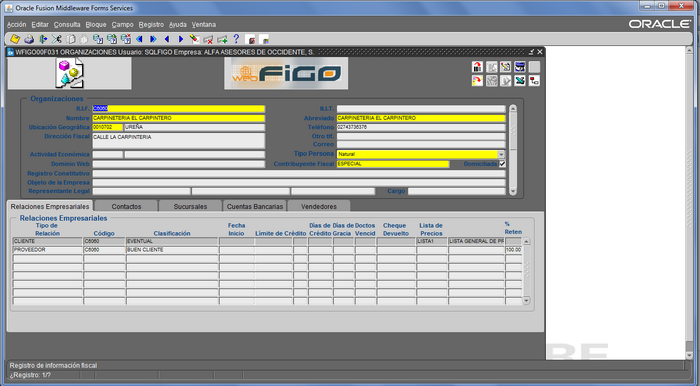
It does not match the actual values. It has not taken new values.
And even if i use sample custom color scheme it is not working.
Please help!!!!