I have an editable interactive grid, and want to display a cell value in red if it is a negative number.
I have accomplished this via SQL query, and HTML Expression i.e.
SQL Query:
SELECT balance_amt,
CASE SIGN(balance_amt)
WHEN -1 THEN 'color:red;font-weight:bold;'
END BALANCE_COLOR_STYLE
FROM balance_info;
HTML Expression in the InteractiveGrid column:
<span style=&BALANCE_COLOR_STYLE.>&balance_amt.</span>
This is working correctly for display purpose.
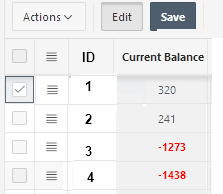
However, when I try to edit the cell value, Apex automatically disables/grays out the column and does not allow me to update it.
Even if it did allow me to edit values, the logic to change font color is in SQL query, which would not run until I saved the page and reloaded it.
Hence, I believe I need to accomplish this logic using JavaScript in Dynamic Action that fires upon value change, or possibly HTML expression.
However, I am not able to come up with required code.
Kindly help! Thank you!