Hi,
I am using APEX 19.1 on DB 12c
I am using the Flex-field functionality in my application -similar to packaged APP - CUSTOMER TRACKER.
Everything is working fine except for one thing - The format mask is not getting applied correctly.
When I see the code in Plug-in - there is this code which updates the format mask
apex_app_builder_api.edit_page_item (
                p\_page\_id             => apex\_application.g\_flow\_step\_id,

                p\_item\_name           => p\_item.name,

                p\_format\_mask         => l\_flex\_config.format\_mask);
when I debug the values, I can see correctly that the Page-ID, Item name and the l_flex_config.format_mask values are correct.
The field is getting updated with NULL format mask on the page. So i get the default format mask of Timestamp with local timezone
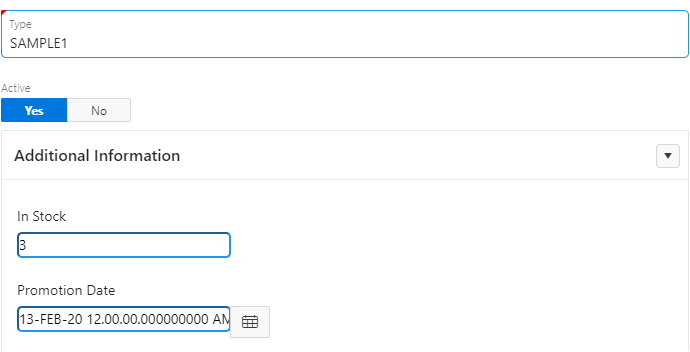
As you can see the Promotion Date is a Flex Field with wrong format mask. I have assigned 'DD-Mon-RR' as the format mask while setting the flex field.
I'm really stuck in this. Could anyone help solve this please?
Also - The plugin version is 5.0.1. So, It is not accepting the latest "Optional-Floating" label type.
How to solve this please?
Thanks,
Veerendra.