Hello.
Hello, I installed <OracleDivaDB_3-1-0_12_2_0_1_SE2_Windows_64-bit> and <DIVArchive_7.6.2.110>.
Later, I tried to install User and Schema in the database, but there was an error.
I tried to install it through cmd because the manual book I visited said it could be installed as Command Line (CMD),
but the installation was not completed due to an error.
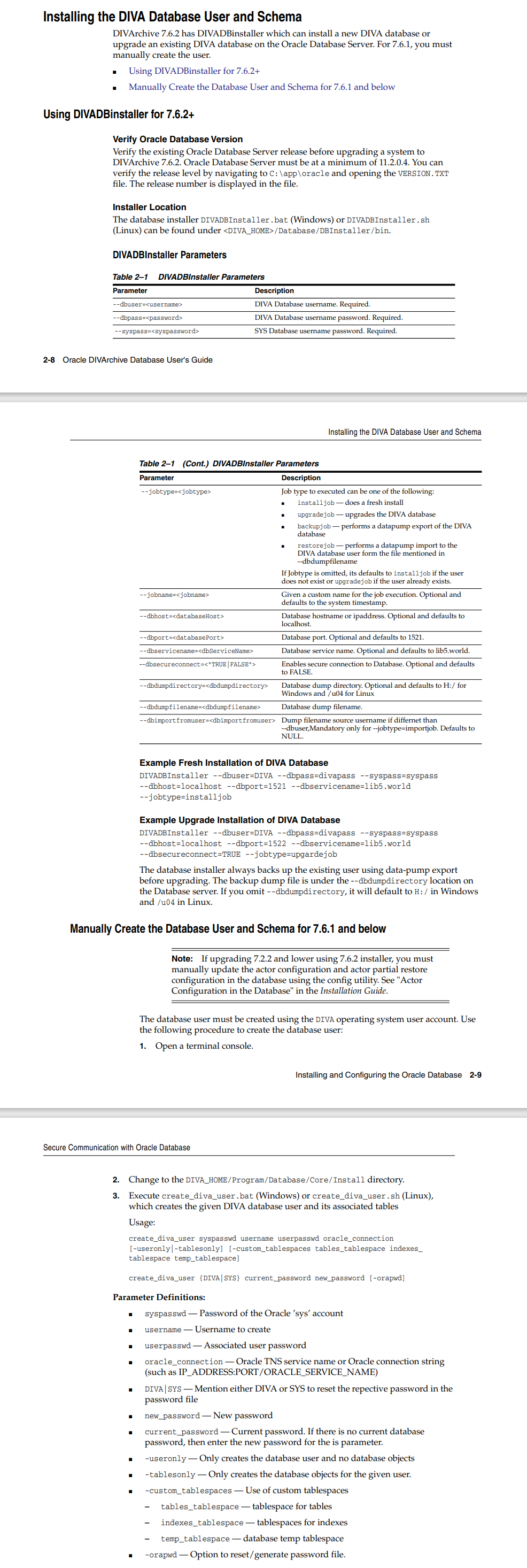
Below is a capture of the DIVA 7.6.2 manual I found.
DIVA 7.6.2.pdf
Below is the cmd log I tried.
create_diva_user Error Log.txt
Microsoft Windows [Version 6.3.9600]
(c) 2013 Microsoft Corporation. All rights reserved.
C:\Users\Administrator>cd ../../
C:\>cd DIVA\Program\Database\Core\Install
C:\DIVA\Program\Database\Core\Install>create_diva_user DivL2b5 diva lib5 127.0.0
.1:1521/lib5.world -useronly -custom_tablesplaces tables_tablespace
Usage :
"create_diva_user.bat syspasswd username userpasswd oracle_connection [-useronly
|-tablesonly] [-custom_tablespaces tables_tablespace indexes_tablespace temp_tab
lespace]"
"create_diva_user.bat DIVA|SYS current_password new_password -orapwd"
 Create the given DIVA database user and its associated tables.
 Parameters:
    syspasswd          : Password of the Oracle 'sys' account.
    username           : Username to create.
    userpasswd         : Associated user password.
    oracle_connection  : Oracle TNS Service Name or Oracle connection string. (
Ex: IP_ADRESS:PORT/ORACLE_SERVICE_NAME)
    DIVA|SYS           : Mention either DIVA or SYS to reset the respective pas
sword in the password file.
    new_password       : New password.
    current_password   : current password, If there is no current database pass
word, then simply enter the new password for this parameter.
 Options:
    -useronly             : only creates the database user and no datbase objec
ts
    -tablesonly           : only creates the database objects for the give user
    -custom_tablespaces   : using of custom tablespaces
      tables_tablespace   : tablespace for tables
      indexes_tablespace  : tablespace for indexes
      temp_tablespace     : database temp tablespace
    -orapwd               : Option to reset/generate password file.

C:\DIVA\Program\Database\Core\Install>
DIVADBInstaller Error Log.txt
Microsoft Windows [Version 6.3.9600]
(c) 2013 Microsoft Corporation. All rights reserved.
C:\Users\Administrator>cd ../../
C:\>cd DIVA\Program\Database\DBInstaller\bin
C:\DIVA\Program\Database\DBInstaller\bin>DIVADBInstaller --dbuser=diva --dbpass=
lib5 --dbhost=127.0.0.1 --dbport=1521 --dbservicename=lib5.world --jobtype=insta
lljob
INFO : **********************Initialization************************************
*****
INFO : -->Installer Version :7.6.2.173
ERROR : --> Upgrade Initilization failed
DIVArchive Database Installer
"Usage:   DIVADBInstaller.bat --dbuser=<username> --dbpass=<password> --syspass=
<syspassword> --jobtype=<jobtype> "
"                [--jobname=<jobname>] [--dbhost=<databaseHost>] [--dbport=<data
basePort>]"
"                [--dbservicename=<dbServiceName>] [--dbsecureconnect=<TRUE|FALS
E>]"
"                [--dbdumpdirectory=<dbdumpdirectory>] [--dbdumpfilename=<dbdump
filename>] --dbimportfromuser=<dbimportfromuser>"
where :
  --dbuser=<username>                  DIVA Database username, Mandatory parame
ter.
  --dbpass=<password>                  DIVA Database username password, Mandato
ry parameter.
  --syspass=<syspassword>              SYS Database username password, Mandator
y parameter.
  --jobtype=<jobtype>                  Job type to executed must be installjob
or upgradejob or backupjob or restorejob, optional parameter.
                                               If Jobtype is not mentioned, its
defaults to installjob if the user does not exist
                                               or defaults to upgradejob if the
user already exist.
                                               - installjob does a fresh instal
l.
                                               - upgradejob does upgrades the g
iven DIVA database.
                                               - backupjob does datapump export
of the given DIVA database.
                                               - restorejob does datapump impor
t in to the given DIVA database user from the file mentioned in --dbdumpfilename
parameter.
  --jobname=<jobname>                  Given a custom name for the job executio
n.Optional and defaults to system timestamp
  --dbhost=<databaseHost>              Database hostname or ipaddress.Optional
and defaults to localhost
  --dbport=<databasePort>              Database port .Optional and defaults to
1521
  --dbservicename=<dbServiceName>      Database Servicename .Optional and defau
lts to lib5.world
  --dbsecureconnect=<"TRUE|FALSE">     Enable secure connection to Database. Op
tional and defaults to FALSE
  --dbdumpdirectory=<dbdumpdirectory>  Database dump directory .Optional and de
faults to H:/ in windows and /u04 in linux
  --dbdumpfilename=<dbdumpfilename>    Database dump filename.
  --dbimportfromuser=<dbimportfromuser>   Dump filename source username if diff
ernet than --dbuser,used only for --jobtype=restorejob. Defaults to NULL

" OR "
"DIVADBInstaller.bat DIVA|SYS current_password new_password --orapwd"
  --orapwd          Option to reset/generate password file.
  DIVA|SYS         Mention either DIVA or SYS to reset the respective password
in the password file.
  current_password  current password, If there is no current database password,
then simply enter the new password for this parameter.
  new_password      New password.

*****************************************************
DIVArchive Database Installer Failed
please refer to DIVArchive Database Installer log file at C:\DIVA\Program\Databa
se\DBInstaller\bin\..\..\..\log\diva_database_installer for further details
*****************************************************
C:\DIVA\Program\Database\DBInstaller\bin>
How can I solve this problem?