I have installed Oracle 12C and Oracle Apex 19.1 on a USB drive connected to my Windows 10 PC.
When I attempt to access Oracle EM, I get asked for authentication. Nothing that I put in here is accepted. I have tried my windows logon, the system@orcl logon, the sys@orcl logon and the XDB account logon

Actually, the XDB logon does not work in sqlplus either:
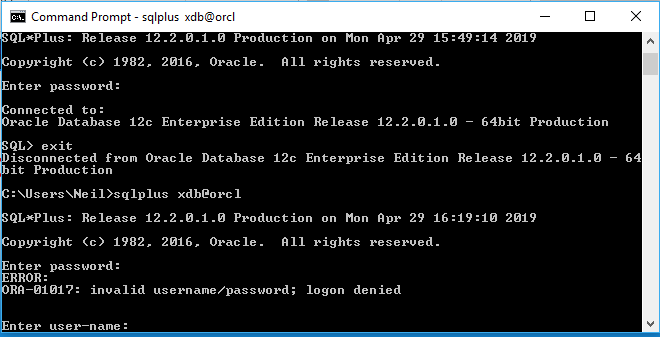
I have tried the fixes (main ones highlighted) in this powershell script:
$pass = ""
#if password contains a $ then precede with ` as in fed`$ifd19824
$stmt ="select name,open_mode from v$" + "pdbs;
column username format a30
column user_id format 9999999999
select username,user_id from all_users order by username;
COLUMN PDB_NAME FORMAT A15
SELECT PDB_ID, PDB_NAME, STATUS FROM DBA_PDBS ORDER BY PDB_ID;
select service_id, name from CDB_SERVICES;
COL NAME FORMAT A30
COL CON_NAME FORMAT A20
SELECT NAME,CON_NAME, CON_ID
FROM V$" +"ACTIVE_SERVICES
WHERE UPPER(NAME) != CON_NAME
AND CON_ID !=1
ORDER BY CON_ID;
select name,open_mode from v$" +"pdbs;
--Expect APEX_190100, APEX_INSTANCE_ADMIN_USER, APEX_PUBLIC_USER, FLOWS_FILES
--Per: https://ahmadfattah.wordpress.com/2018/01/24/installing-oracle-apex-5-1-4-on-oracle-database-12c-r2/
EXEC DBMS_XDB.sethttpport(8080);
SELECT DBMS_XDB.gethttpport FROM DUAL;
ALTER USER APEX_PUBLIC_USER ACCOUNT UNLOCK;
ALTER USER ANONYMOUS ACCOUNT UNLOCK;
ALTER USER XDB ACCOUNT UNLOCK;
ALTER USER FLOWS_FILES ACCOUNT UNLOCK;
ALTER USER APEX_INSTANCE_ADMIN_USER ACCOUNT UNLOCK;
START N:\app\OracleHome\product\12.2.0\dbhome_1\rdbms\admin\EPGSTAT.SQL
/*
Per: https://dba.stackexchange.com/questions/186235/oracle-12c-can-not-login-to-enterprise-manager-xdb-login-prompt
you should enable global port for EM Express to Manage a CDB and the PDBs, execute:
*/
show con_name
select sys_context('USERENV','SESSION_USER') from dual;
exec dbms_xdb_config.SetGlobalPortEnabled(TRUE)
-- this did not work for me
/* https://community.oracle.com/message/15317200#15317200
alter user ANONYMOUS identified by POINTLESS_CANOES account unlock;
alter user XDB identified by EXCEEDING_JUSTICE account unlock;
grant create session to ANONYMOUS;
CONNECT / AS SYSDBA
ALTER USER ANONYMOUS ACCOUNT UNLOCK;
ALTER USER XDB ACCOUNT UNLOCK;
ALTER USER FLOWS_FILES ACCOUNT UNLOCK;
ALTER USER APEX_INSTANCE_ADMIN_USER ACCOUNT UNLOCK;
START N:\app\OracleHome\product\12.2.0\dbhome_1\rdbms\admin\EPGSTAT.SQL
"
$stmt
$res = ($stmt | sqlplus system/$pass@orcl)
#if password contains a $ then precede with ` as in fed`$ifd19824
$stmt ="
/* Per: https://community.oracle.com/message/15317200#15317200
show con_name
select sys_context('USERENV','SESSION_USER') from dual;
exec dbms_xdb_config.SetGlobalPortEnabled(TRUE)
"
$stmt
$res = ($stmt | sqlplus sys/$pass@orcl as sysdba)
$res
How do I fix the authentication so that it is no longer prompted or which logon is required?