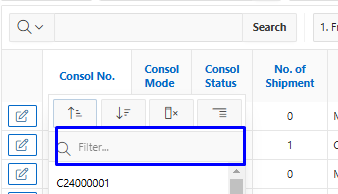
Enhanced Features for Popup LOV in Oracle APEX Column wise search option same like interactive report
Background:
The column-wise search functionality in Oracle APEX Interactive Reports and Interactive Grids provides users with a powerful tool to search and filter data seamlessly. However, this functionality is currently not available in the Popup LOV component, which limits its usability for advanced search scenarios.
Requirement:
Enhance the Popup LOV component in Oracle APEX to include the following features:
Column-Wise Search:
- Enable column-wise search functionality for Popup LOVs, similar to what is available in Interactive Reports and Interactive Grids.
- Users should be able to search within individual columns of the LOV data set, making it easier to locate specific records.
Create or View Button:
- Add an "Add New" or "Create" button directly within the Popup LOV interface.
- This button should allow users to create a new record if the desired data is not available in the LOV's current dataset.
- Include a "View" or "Edit" button to allow users to view or modify the details of an existing record directly from the Popup LOV.
Enhanced Usability:
- Provide additional configuration options to allow developers to:
- Define which columns are searchable.
- Customize the behavior of the "Create" and "View" buttons (e.g., open a modal dialog, navigate to a form page, etc.).
- Ensure these features are consistent with APEX's low-code philosophy and are easy to integrate into existing applications.
Benefits:
- Improves the user experience by enabling granular and targeted searches within Popup LOVs.
- Eliminates the need for users to navigate away from the current page to create or edit master data.
- Enhances developer productivity by reducing the need for custom development to implement such functionality.
Use Case Example:
- A user is searching for a customer in a sales order form. If the customer's record is not found in the LOV, the user can immediately create a new customer without leaving the form.
- While searching for products in a Popup LOV, users can quickly locate items using column-specific filters, such as product category, price range, or availability.
Request Summary:
We request the Oracle APEX development team to consider incorporating these enhancements into future releases of APEX. These features would significantly enhance the functionality and user experience of Popup LOVs, aligning them with the powerful search capabilities of other APEX components like Interactive Reports and Grids.
- Below screen shows for popup lov with multiple column.

2. Filter options for the selected column are displayed when clicked.