Hi,
Wanted to know how to force 'value required' attribute for the disabled item after it is 'enabled' by a dynamic action.
For example, let's consider Employee form. I would like to disable Job and Salary column. As soon as user enters Employee Name, I will 'enable' JOB and SAL columns using 'dynamic action'.
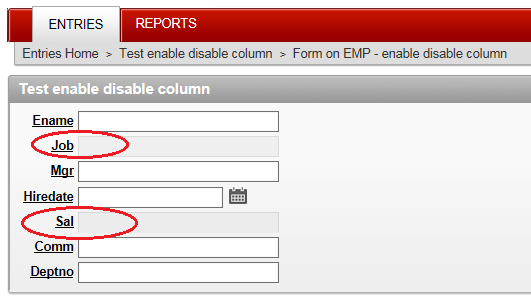
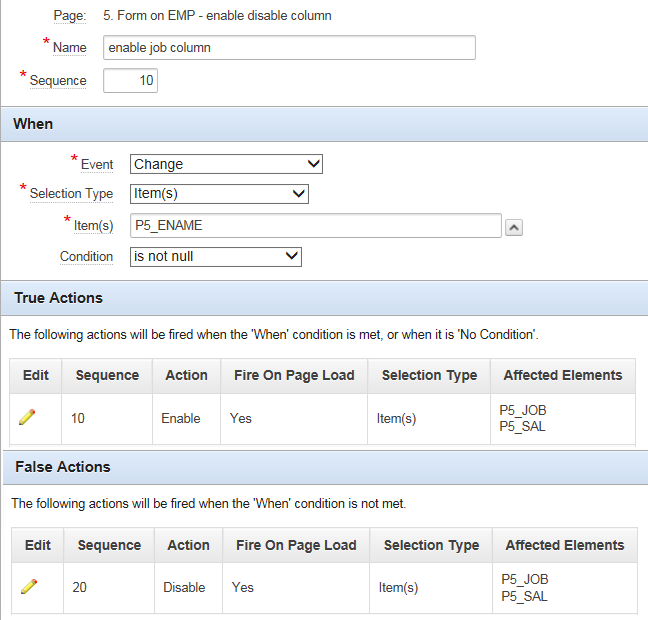
And above works fine. Please note that, both JOB & SAL is 'NULL' columns as per DB table. My question is, how to enforce 'value required' condition to yes, after enabling them.
One more example would be, when user selects 'Cheque' or 'Draft', the 'Draft No.' column will be enabled. Otherwise 'Draft No.' column is disabled (that means value is not required). However, when it is enabled, I want to enforce 'value required' to that column. How to achieve this? (i use APEX 4.2.6)
Thanks,
-Anand