Hello,
I am trying to create a score card in an Apex tool.
I envision using a Master Detail form with the work items to be scored being the Master and the score table being the detail section.
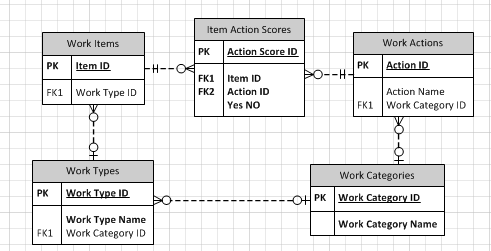
Each work item in the Master table has a work type assigned to it ,which translates into a work category, and each work category has multiple criteria to be graded on.
I would like when a user selects a work item and is branched to the detail page, the tabular form adds a number of rows with pre-filled out criteria.
For example, a user would click on an item that is a "Car Wash" category item.
Upon arriving at the Detail form, the tabular form should have 3 rows with 2 columns. Column A would list the action (ie. Washed with soap?, Rinsed with water?, Dried?) And column B would have a radio group of Yes/No.
If the user instead selected a work item of category "Cleaned Room", the tabular form would load with 2 added rows of columns A and B. Column A would list the action (ie. Bed Made?, Cloths put away?) And column B would have a radio group of Yes/No
Is this possible with Tabular forms or is there a better way to do this? I've included picture of how the tables are connected.
Any insights on how best to approach this is appreciated!