Hi
Using APEX 5.1.3 with DBaaS 12.2
I have a page item P127_FILE_ATTACHMENT of type File Browse
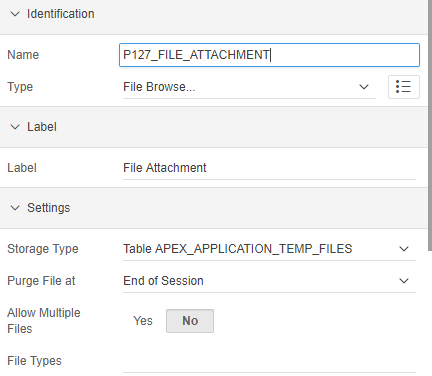
This page item uses Table APEX_APPLICATION_TEMP_FILES as the storage type as you can see in the image below.
I call a procedure that references the temp table apex_application_temp_files to retrieve the file name, mime type and the blob value. This works, and the correct BLOB is saved in the database.
My question is about downloading this file. I have a download link P127_DOWNLOAD_LINK based on the output of the following PL/SQL code:
begin
sys.htp.p('<a href="' || apex_util.get_blob_file_src('P127_FILE_ATTACHMENT',:P127_ID) || '">'||apex_escape.html(:P127_FILE_NAME)||'</a>');
end;
It displays as you can see in the image below. However, when I click on the download link, the file type and the file name is not recognised and it downloads a file called 'Download'. The information inside the file is correct, but it doesn't automatically pick up the name or the mime type.
If I were to change the Storage type to BLOB column specified in item source attribute, it gives me the opportunity to associate both the file name and the mime type, but not with Table APEX_APPLICATION_TEMP_FILES

Any idea how to get this to work, so that the BLOB downloads with the correct file name and type?
Thanks
Annelize