When I query a TIMESTAMP WITH TIME ZONE, in Query Result grid it falsely converts to my Windows timezone. This does not happen when running as script or in sqlcl.
Extension version: 25.3.2 (downgraded from 25.4 due to 25.4 package compilation bug.)
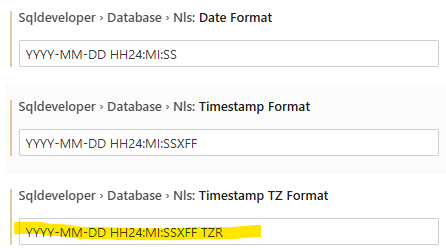
Extension setting for timestamp with time zone:
I discovered the issue while testing result of various ways of creating a TIMESTAMP WITH TIME ZONE using this script:
set pagesize 50
set linesize 200

alter session set TIME_ZONE = '+00:00';
alter session set NLS_TIMESTAMP_TZ_FORMAT = 'YYYY-MM-DD HH24:MI:SSXFF TZR';
alter session set NLS_TERRITORY = 'AMERICA';

select dbtimezone, sessiontimezone from dual;

select * from nls_session_parameters where parameter in ('NLS_TIMESTAMP_TZ_FORMAT','NLS_TERRITORY');

column note format a20
column ts format a50
column ts_char format a60
column ts_dump format a60

with t (note, ts) as (
values
('literal offset 0', timestamp '2026-01-13 07:45:01+00:00')
, ('to_utc_tz offset 0', to_utc_timestamp_tz( '2026-01-13T07:45:02+00:00' ))
, ('to_tz offset 0', to_timestamp_tz('2026-01-13 07:45:03+00:00', 'YYYY-MM-DD HH24:MI:SS+TZH:TZM'))
--
, ('literal UTC' , timestamp '2026-01-13 07:45:11 UTC')
, ('to_utc_tz Z' , to_utc_timestamp_tz( '2026-01-13T07:45:12Z' ))
, ('to_tz UTC' , to_timestamp_tz('2026-01-13 07:45:13 UTC', 'YYYY-MM-DD HH24:MI:SS TZR'))
--
, ('literal offset 1', timestamp '2026-01-13 08:45:21+01:00')
, ('to_utc_tz offset 1', to_utc_timestamp_tz( '2026-01-13T08:45:22+01:00' ))
, ('to_tz offset 1', to_timestamp_tz('2026-01-13 08:45:23+01:00', 'YYYY-MM-DD HH24:MI:SS+TZH:TZM'))
--
, ('literal Eur/Cop' , timestamp '2026-01-13 08:45:31 Europe/Copenhagen')
, ('to_tz Eur/Cop' , to_timestamp_tz('2026-01-13 08:45:33 Europe/Copenhagen', 'YYYY-MM-DD HH24:MI:SS TZR'))
)
select
note
, ts
, to_char(ts, 'YYYY-MM-DD HH24:MI:SSXFF TZR "{"TZH:TZM"}"') as ts_char
, dump(ts) as ts_dump
from t;
Running in sqlcl gets this result, which is as expected with 6 rows showing 07:45 (the time in offset +00) and 5 rows showing 08:45 (the time in offset +01 - Copenhagen):
SQL> set pagesize 50
SQL> set linesize 200
SQL>
SQL> alter session set TIME_ZONE = '+00:00';

Session altered.

SQL>
SQL> select dbtimezone, sessiontimezone from dual;
SQL> select dbtimezone, sessiontimezone from dual;

DBTIMEZONE    SESSIONTIMEZONE

SQL> set pagesize 50
SQL> set linesize 200
SQL>
SQL> alter session set TIME_ZONE = '+00:00';

Session altered.

SQL> alter session set NLS_TIMESTAMP_TZ_FORMAT = 'YYYY-MM-DD HH24:MI:SSXFF TZR';

Session altered.

SQL> alter session set NLS_TERRITORY = 'AMERICA';

Session altered.

SQL>
SQL> select dbtimezone, sessiontimezone from dual;

DBTIMEZONE    SESSIONTIMEZONE
_____________ __________________
+00:00        +00:00

SQL>
SQL> select * from nls_session_parameters where parameter in ('NLS_TIMESTAMP_TZ_FORMAT','NLS_TERRITORY');

PARAMETER                  VALUE
__________________________ _______________________________
NLS_TERRITORY              AMERICA
NLS_TIMESTAMP_TZ_FORMAT    DD-MON-RR HH.MI.SSXFF AM TZR

SQL>
SQL> column note    format a20
SQL> column ts      format a50
SQL> column ts_char format a60
SQL> column ts_dump format a60
SQL>
SQL> with t (note, ts) as (
  2     values
  3        ('literal   offset 0', timestamp '2026-01-13 07:45:01+00:00')
  4      , ('to_utc_tz offset 0', to_utc_timestamp_tz( '2026-01-13T07:45:02+00:00' ))
  5      , ('to_tz     offset 0', to_timestamp_tz('2026-01-13 07:45:03+00:00', 'YYYY-MM-DD HH24:MI:SS+TZH:TZM'))
  6  --
  7      , ('literal   UTC'     , timestamp '2026-01-13 07:45:11 UTC')
  8      , ('to_utc_tz Z'       , to_utc_timestamp_tz( '2026-01-13T07:45:12Z' ))
  9      , ('to_tz     UTC'     , to_timestamp_tz('2026-01-13 07:45:13 UTC', 'YYYY-MM-DD HH24:MI:SS TZR'))
 10  --
 11      , ('literal   offset 1', timestamp '2026-01-13 08:45:21+01:00')
 12      , ('to_utc_tz offset 1', to_utc_timestamp_tz( '2026-01-13T08:45:22+01:00' ))
 13      , ('to_tz     offset 1', to_timestamp_tz('2026-01-13 08:45:23+01:00', 'YYYY-MM-DD HH24:MI:SS+TZH:TZM'))
 14  --
 15      , ('literal   Eur/Cop' , timestamp '2026-01-13 08:45:31 Europe/Copenhagen')
 16      , ('to_tz     Eur/Cop' , to_timestamp_tz('2026-01-13 08:45:33 Europe/Copenhagen', 'YYYY-MM-DD HH24:MI:SS TZR'))
 17  )
 18  select
 19     note
 20   , ts
 21   , to_char(ts, 'YYYY-MM-DD HH24:MI:SSXFF TZR "{"TZH:TZM"}"') as ts_char
 22   , dump(ts) as ts_dump
 23* from t;

NOTE                  TS                                                   TS_CHAR                                                     TS_DUMP
_____________________ ____________________________________________________ ___________________________________________________________ _______________________________________________________
literal   offset 0    13-JAN-26 07.45.01.000000000 AM GMT                  2026-01-13 07:45:01.000000000 +00:00 {+00:00}               Typ=181 Len=13: 120,126,1,13,8,46,2,0,0,0,0,20,60
to_utc_tz offset 0    13-JAN-26 07.45.02.000000000 AM GMT                  2026-01-13 07:45:02.000000000 +00:00 {+00:00}               Typ=181 Len=13: 120,126,1,13,8,46,3,0,0,0,0,20,60
to_tz     offset 0    13-JAN-26 07.45.03.000000000 AM GMT                  2026-01-13 07:45:03.000000000 +00:00 {+00:00}               Typ=181 Len=13: 120,126,1,13,8,46,4,0,0,0,0,20,60
literal   UTC         13-JAN-26 07.45.11.000000000 AM UTC                  2026-01-13 07:45:11.000000000 UTC {+00:00}                  Typ=181 Len=13: 120,126,1,13,8,46,12,0,0,0,0,208,4
to_utc_tz Z           13-JAN-26 07.45.12.000000000 AM GMT                  2026-01-13 07:45:12.000000000 +00:00 {+00:00}               Typ=181 Len=13: 120,126,1,13,8,46,13,0,0,0,0,20,60
to_tz     UTC         13-JAN-26 07.45.13.000000000 AM UTC                  2026-01-13 07:45:13.000000000 UTC {+00:00}                  Typ=181 Len=13: 120,126,1,13,8,46,14,0,0,0,0,208,4
literal   offset 1    13-JAN-26 08.45.21.000000000 AM +01:00               2026-01-13 08:45:21.000000000 +01:00 {+01:00}               Typ=181 Len=13: 120,126,1,13,8,46,22,0,0,0,0,21,60
to_utc_tz offset 1    13-JAN-26 08.45.22.000000000 AM +01:00               2026-01-13 08:45:22.000000000 +01:00 {+01:00}               Typ=181 Len=13: 120,126,1,13,8,46,23,0,0,0,0,21,60
to_tz     offset 1    13-JAN-26 08.45.23.000000000 AM +01:00               2026-01-13 08:45:23.000000000 +01:00 {+01:00}               Typ=181 Len=13: 120,126,1,13,8,46,24,0,0,0,0,21,60
literal   Eur/Cop     13-JAN-26 08.45.31.000000000 AM EUROPE/COPENHAGEN    2026-01-13 08:45:31.000000000 EUROPE/COPENHAGEN {+01:00}    Typ=181 Len=13: 120,126,1,13,8,46,32,0,0,0,0,133,236
to_tz     Eur/Cop     13-JAN-26 08.45.33.000000000 AM EUROPE/COPENHAGEN    2026-01-13 08:45:33.000000000 EUROPE/COPENHAGEN {+01:00}    Typ=181 Len=13: 120,126,1,13,8,46,34,0,0,0,0,133,236

11 rows selected.
Running as script gives same expected result.
Running the statement gives a query result where TS column falsely has been converted to GMT+1:
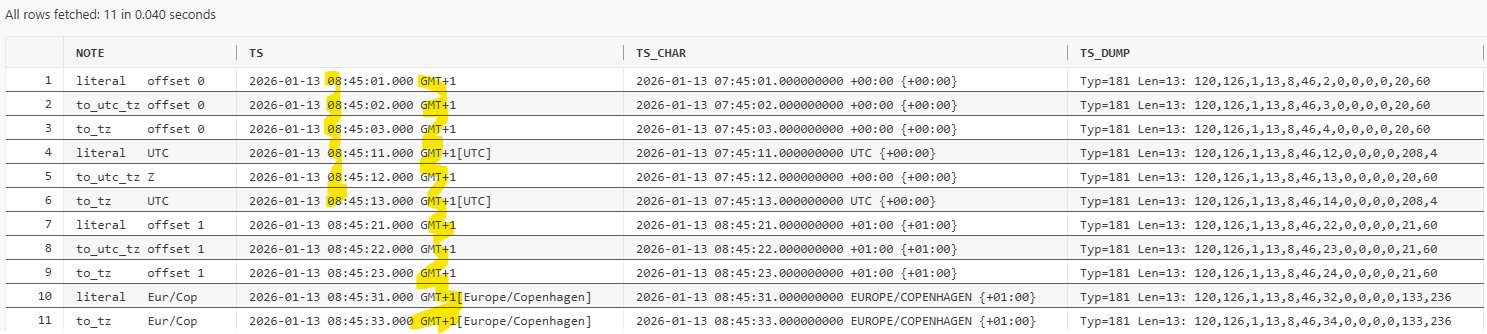
I found out that this is my Windows timezone. If I change my Windows timezone to Eastern Time and go back in VSCode and press F9, I get this:
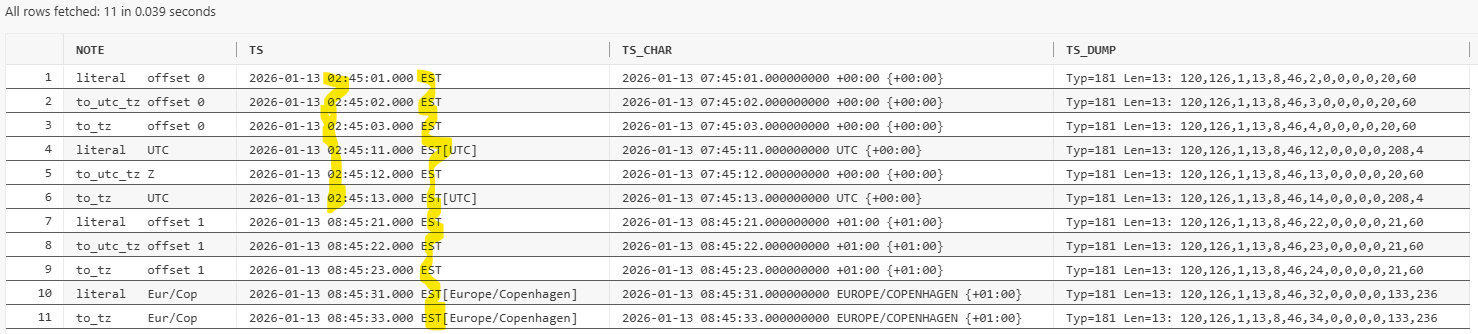
It looks to me like the first 6 rows (those timestamps that have offset 0) have their time converted to the Windows timezone, while the 5 rows that are timestamps with offset 1 are not converted?
And the TZR output in the TS column displays the Windows timezone no matter what the actual timezone in the timestamp is?
Can I ask, please, that the TIMESTAMP WITH TIME ZONE column displays the same value in the Query Result grid as it does when executing as script?
(Okay, I guess probably execute as script must obey the format in NLS_TIMESTAMP_TZ_FORMAT session parameter, while F9 uses Timestamp TZ Format in the extension settings, that's okay. But even if it's two different places to configure display format, the value shown should be correct and identical whether using script or sqlcl or F9.)
Cheerio
/Kim