Oracle APEX 24.1.2 in the cloud
Below is demonstrated online at: AF_PLAYS | demo | demoaf123 (page 13)
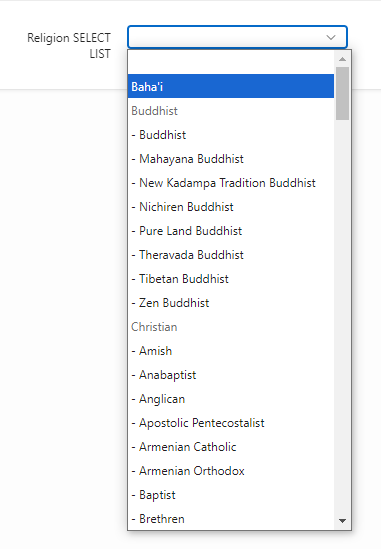
On my page, I have a Select List page item displaying data from a table with a recursive relationship. In this list of ‘Religions’ the user can only select options from ‘Level 2’ if there is a parent row. For example in the following image you can see ‘Buddhist’ and ‘Christian’ is disabled and the user has to select one of the sub religions.
I achieve this by creating a hidden page item, that holds the ID's of all the ‘parent items with children’ and then, using Javascript on Execute when Page Loads.
// disable root codes
//select list
var $religion_root_codes = $v("P13_SELECT_LIST_ROOTS");
var religion_code_arr    = $religion_root_codes.split('|');

for( var i = 0, len = religion_code_arr.length; i < len; i++ ) {
 $('#P13_SELECT_LIST option[value=' + religion_code_arr[i] + ']').attr('disabled',true);
}
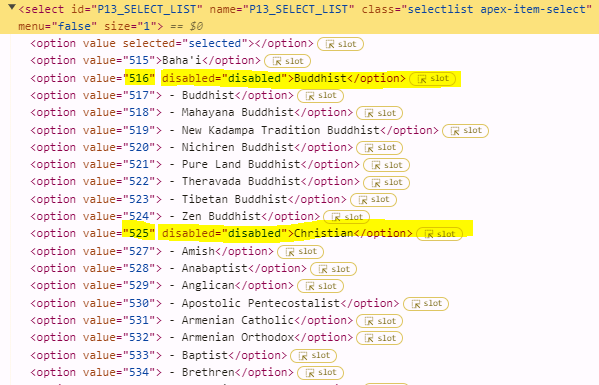
This works well for a Select List, however not for a POPUP LOV. Looking the source, I can see that this is a completely different type of item and the ‘option’ is not used. Does anyone have an idea of how I might be able to achieve the same?
The main reason for me wanting to switch to a popup lov is because it gives the user the ability to search for the religion / language / ethnicity in similar lists, as they are quite large.
Thank you
Annelize