Hi All,
I posted a few things a while back regarding some values (data markers) not fitting into some bar charts, specifically stacked vertical bar charts. BTW -Thanks for the replies
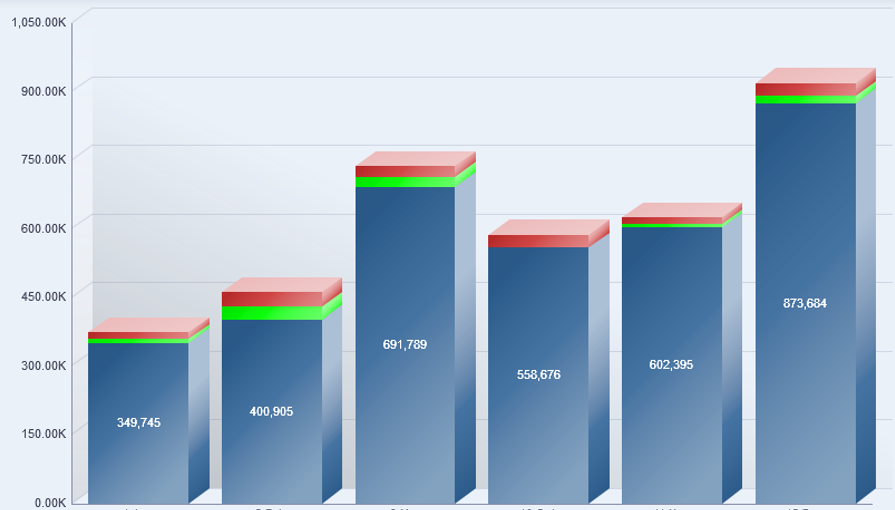
Now, I have found that there may be a decent workaround using the 100% stacked vertical bar chart. By using that style, and changing the data markers to 'actual values' (from default/percentages) it doesn't some to behave in the same way. Here is an example with the exact same data:
Stacked Vertical (some values missing ... in small "slices"):
100% Stacked Vertical (no issues with the bars ... looks like even some of the numbers are smaller, dynamically?)
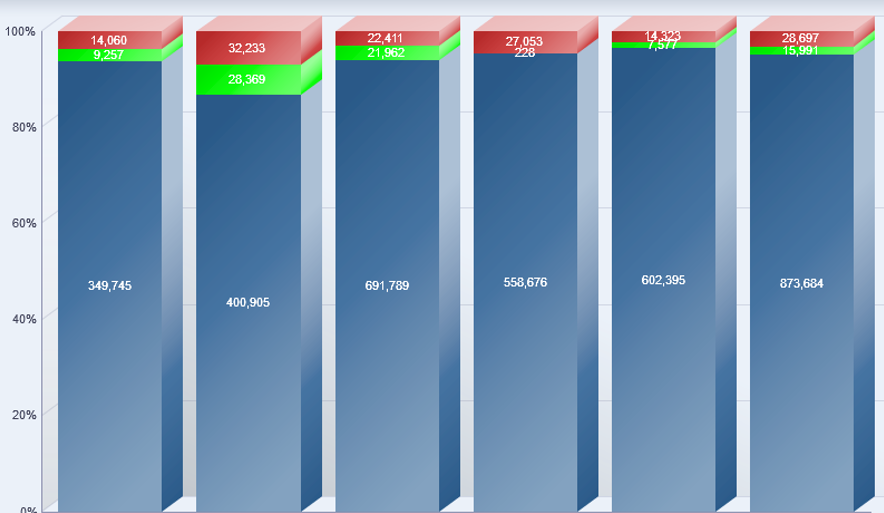
However, as you may notice, the Y-axis still is expressed as a percentage ... and I cannot find a way to change it. Could be a little confusing as the the data and labels don't match/align.
Anyone have any ideas how to change the Y-axis labels to the actual values?
OBIEE 11.1.1.9.3 (OBIA 11.1.1.10.1)
Regards,
Charles