By Shea Nolan
Introduction
In we highlighted the use of Extensions in the Oracle Commerce Cloud Service (OCCS) and how widgets are created, packaged, and deployed. In this article, in addition to describing how to create a custom widget, we will highlight other important aspects of widget development including page layout architecture, configuring Knockout observable array properties and data bindings, and leveraging third-party libraries like Bootstrap.
For any of our Oracle Partners, there's much more information as well as downloadable sample code in our OPN Cloud Connection Oracle Commerce Cloud Group. In that community you can find discussion forums, useful documents, and blog posts.
Page Layouts
One of the third-party libraries, in addition to Knockout, used by OCCS is Bootstrap. Bootstrap is a collection of tools for creating web applications. It contains HTML and CSS based design templates for typography, forms, buttons, navigation and other interface components. It also includes optional JavaScript extensions. We'll talk about how we use Bootstrap to manage responsive layouts and, later on, how to create an accordion display.
OCCS divides end user entry points into several pages, including Cart, Checkout, Product, Collection, and Search Results. Each page has a layout which is based on the default Bootstrap grid system utilizing 12 columns. With responsive features enabled that makes for a 940px wide container where the grid adapts to be 724px and 1170px wide depending on your viewport. Below 767px viewports, the columns become fluid and stack vertically.
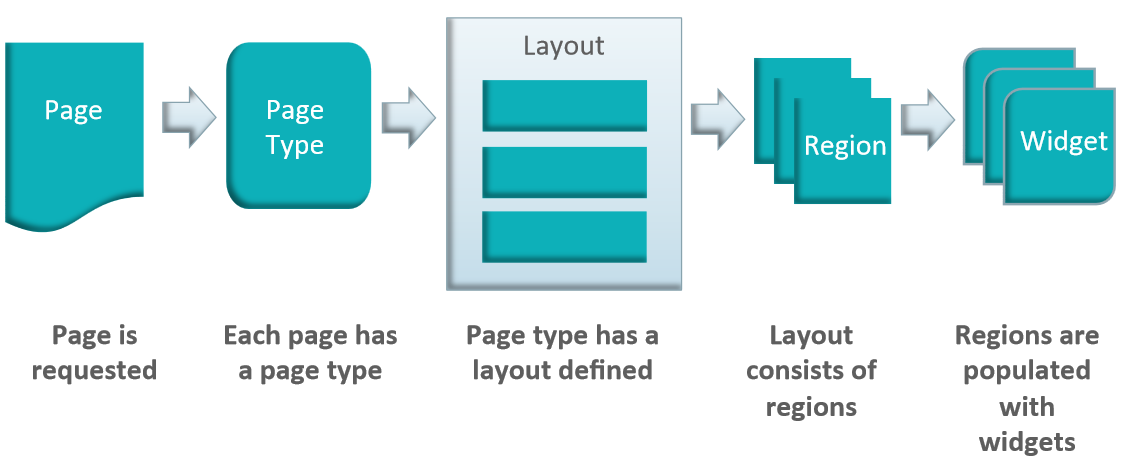
Using the Grid view on the Design tab, OCCS users can manipulate the layout and positioning of widgets within the Bootstrap grid system. Page layouts consist of regions, which roughly correspond to Bootstrap rows within the grid system. These regions are populated with widgets.
The diagram below helps to illustrate how pages work in Commerce Cloud.
User List Widget
In our example, we will create a widget that gets data from a service and displays the response. We will retrieve a list of users and display them as a sidebar on the product display page. In order to ensure that your widget is only available for the Product page set the pageTypes value in your widget meta-data.
{
"name": "User List Widget",
"javascript": "userListWidget",
"jsEditable": true,
"i18nresources": "userListWidget",
"pageTypes": ["product"]
}
Remember the widget meta-data properties are used to specify which resources provide widget functionality. You widget meta-data is always in the widget.json file in the widget directory of your extension. For more information see the Widget Development Guide.
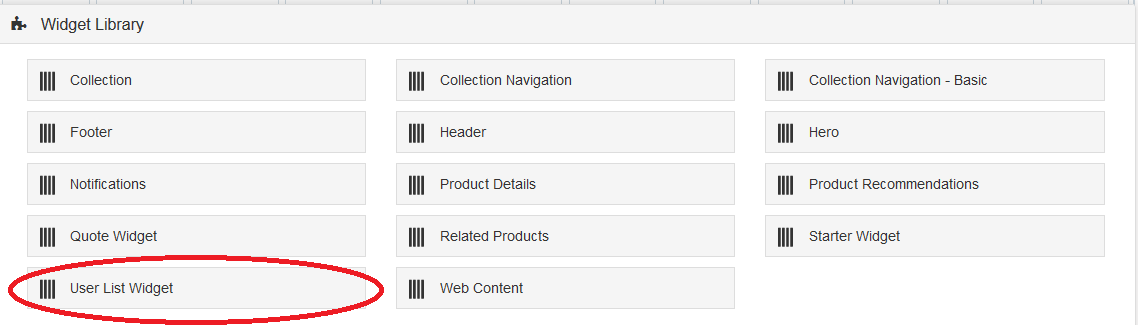
Once you've followed the steps for creating and uploading an Extension that were detailed in the Developing Global Widgets post, the User List widget will be available for use on the Product page layout in grid mode as seen below.
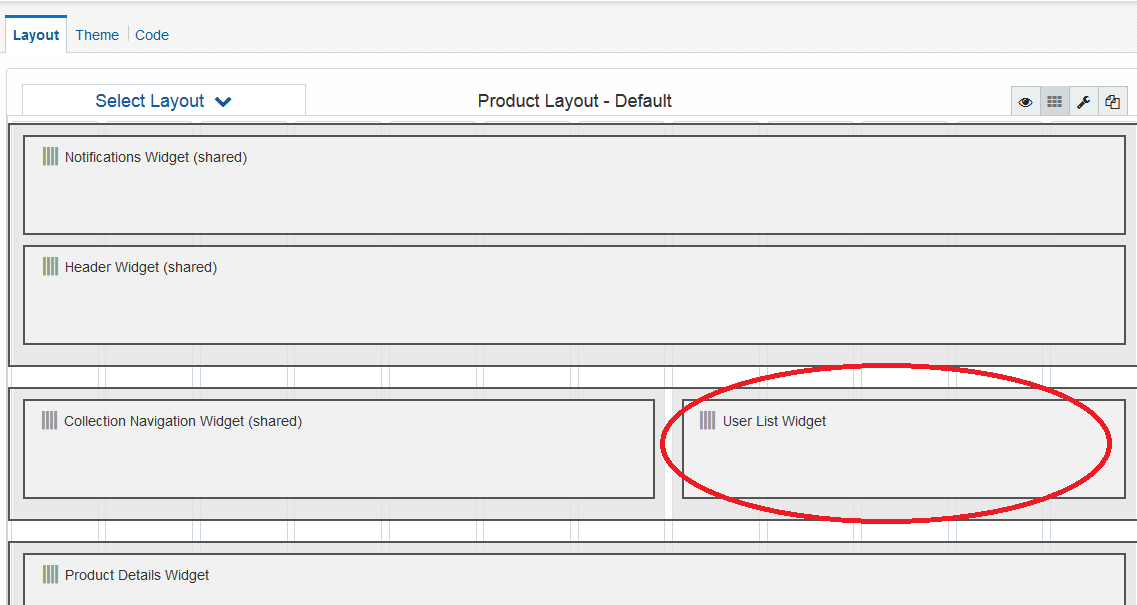
In order to use the widget, place it within the product layout grid display, as in the below example:
Knockout Observable Array
Our widget, like the rest of OCCS, takes advantage of the Knockout.js library and in particular the observable array feature. The User List widget retrieves a list of users - in other words a collection of things. The observable array allows us to detect and respond to changes in the collection simply. Declaring an observable array is simple:
userList: ko.observableArray([])
And displaying the contents of the observable array is equally easy
<!-- ko foreach: userList -->
<span data-bind="text: $data['name']"></span><br>
<!-- /ko -->
Accordion Display
Earlier we discussed how we use Bootstrap to manage responsive layouts. Now let's focus on other aspects of Bootstrap, namely the JavaScript extensions. We will be taking advantage of one of Bootstrap's JavaScript extensions, the Collapse plugin to create an accordion display. With the Bootstrap collapse plugin we can create the accordion without writing any JavaScript code.
<div class="accordion" id="userListAccordion">
\<!-- ko foreach: userList -->

    \<div class="accordion-group"\>

        \<div class="accordion-heading"\>

            \<a class="accordion-toggle" data-toggle="collapse" data-parent="#userListAccordion"

                data-bind="text: $data\['username'\], attr: {href: '#' + $data\['id'\]}">\</a>

        \</div>

        \<div class="accordion-body collapse" data-bind="attr: {id: $data\['id'\]}"\>

            \<div class="accordion-inner"\>

                \<ul>

                    \<li>

                        \<span data-bind="text: $data\['name'\]">\</span>\<br>

                    \</li>

                    \<li>

                        \<span data-bind="text: $data\['email'\]">\</span>\<br>

                    \</li>

                \</ul>

          \</div>

        \</div>

    \</div>

\<!-- /ko -->
</div>
The Bootstrap collapse plugin basically requires two elements to work: the controller element such as a button or hyperlink and the collapsible element itself.
- The data-toggle="collapse" attribute is added to the controller element along with an attribute data-target to automatically assign the control of a collapsible element.
- The data-target or href attribute accepts a CSS selector to apply the collapse to a specific element. Be sure to add the class "collapse" to the collapsible element.
- You can optionally add the class "in" to the collapsible element in addition to the class "collapse" to make it open by default.
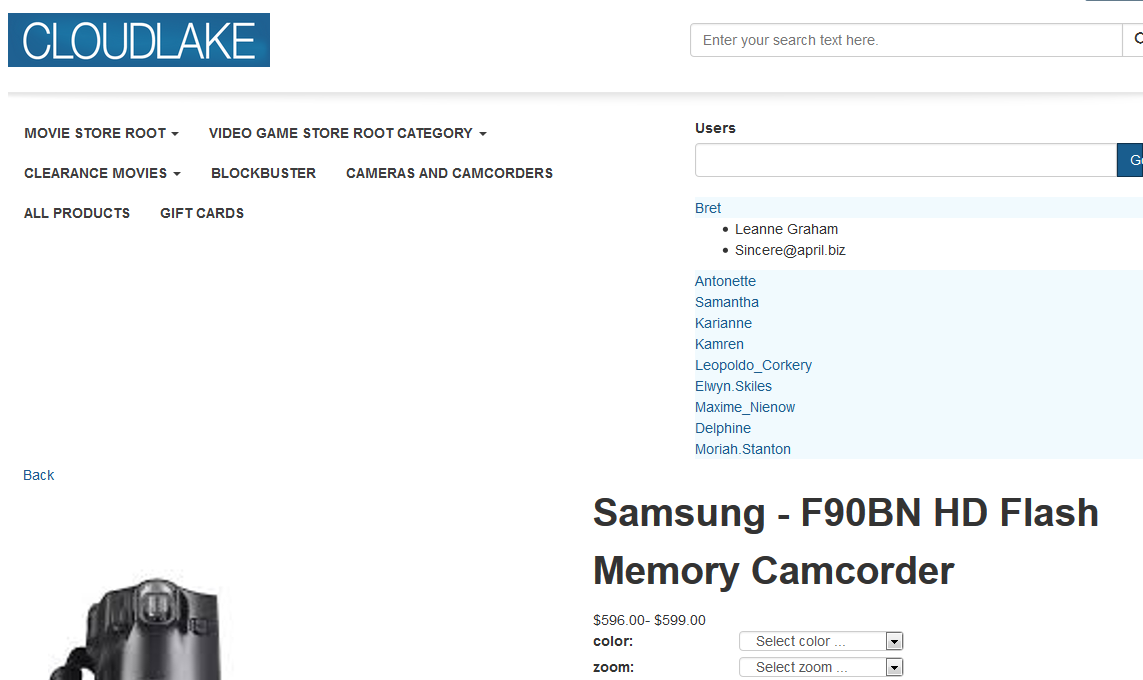
The end result will look like the example below, with the first User item expanded:
Summary
We reviewed how to create a custom user interface widget that can be placed on a particular page type in Commerce Cloud. We also described how Commerce Cloud uses Knockout bindings, in particular, observable arrays to simplify your web application logic. Finally we reviewed how OCCS uses Bootstrap for grid layouts and UI
The full source code for the User List Custom Widget example included in this article is available to Oracle Partners via the OPN Cloud Connection Oracle Commerce Cloud Group.
Don't forget, all Oracle Partners are welcome to the OPN Cloud Connection Oracle Commerce Cloud Group where you can find the full source code for today's example as well as many other Commerce Cloud topics.
About the Author
Shea Nolan is a member of the Oracle Commerce Product Management team focused on the technical enablement of our Cloud Commerce development community. Joining Oracle through the Endeca acquisition, Shea has over 15 years experience as a consultant, developer, and product manager of complex software products with a focus in ecommerce solutions. Shea holds a BA from Northern Illinois University.