Hi,
Bit of a strange one that I cannot replicate on apex.oracle.com or even on new pages in a new test app on our ADB instance, but hoping someone might be able to help anyway.
The issue is, we have an interactive reports that on initial page load show the date in the database default format - in our case DD-MON-YY. However the format should be the application default of YYYY-MM-DD. Below is an example of how it appears on first load.
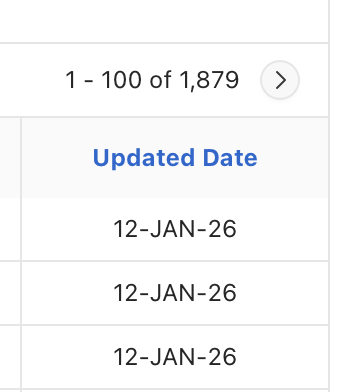
However, pressing “Go” from the interactive report region causes the correct format to appear:
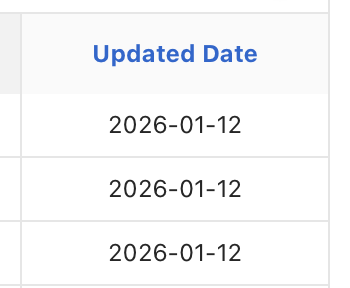
There is no column format being applied and reloading the page causes it to revert to the incorrect DD-MON-YY format but then pressing “Go” or adding a filter or otherwise interacting with the interactive report seems to cause it to use the correct format. I've tried to recreate this on apex.oracle.com but couldn't. I couldn't even recreate the issue in a blank test app on our ADB instance.
The IR is embedded in a “Region Display Selector” region. We are on an up to date ADB database using version 24.2.11, I note that apex.oracle.com is on 24.2.13, but there's nothing in the release notes to suggest that's the difference.
I've checked everything I can think of, debug shows the correct format being applied early in the loading of the page so not really sure what is going on. Can anyone think of anything?
Many thanks
G