I developed and ADF Application on JDeveloper 12.1.2.
It has a database, Java DB ( a.k.a. Derby ).
During development, if remember correctly ( I do document well, but not perfectly ),
when it came time to test using the Data Modeler...
Developing Fusion Web Applications With Oracle ADF
Chapter 6 Defining Master-Detail Related View Objects
6.2.5 How to Test Master-Detail Coordination
http://docs.oracle.com/middleware/1212/adf/ADFFD/bcquerymasterdetail.htm#BABDECGD
In the Applications window, choose Run from the application module's context menu.
MODEL | APPLICATION SOURCES | MYLASTNAME.PPY.MODEL | APPMODULE | run
I think Embedded Driver did not perform well and at that point, the Client Driver seemed to be required.
And, I remember that when opening JDeveloper, JDeveloper would automatically start
the network server and a console window appeared like this...
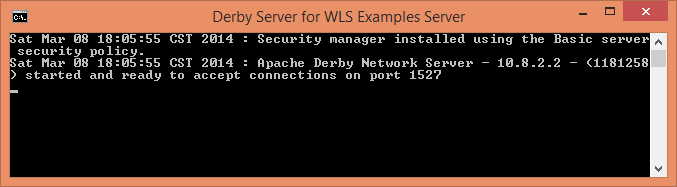
And if there was a problem startng Derby, this would appear...

Anyways, most of the time, it worked well.
I managed to include ADF Essentials libraries with the application and
changed the ( bc4j.xcfg file's ) DataSource to (Glassfish's default JNDI Name) = "jdbc/__default". Success.
The ADF application with a Java DB ( a.k.a. Derby ) ran on GlassFish.
Okay, that was then, this is now.
I deinstalled JDeveloper 12.1.2 and installed Jdeveloper 12.2.1 (generic on top of Java SE 8u51).
C:\Users\Michael>java -version
java version "1.8.0_51"
Java(TM) SE Runtime Environment (build 1.8.0_51-b16)
Java HotSpot(TM) 64-Bit Server VM (build 25.51-b03, mixed mode)
I created a new workspace directory and copied application directory into there and
opened the application...
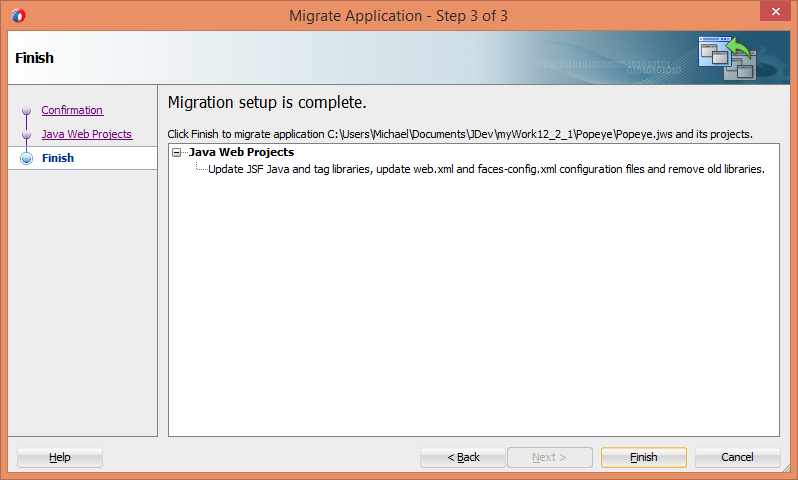
Next, I edited bc4j.xcfg.
There were 2 instances of JDBCDataSource = "jdbc/__default" ( for GlassFish Deployment )
Changed both instances to...
ns0:JDBCDataSource="java:comp/env/jdbc/PopeyeDBDS"
Here's the resulting file...
<?xml version = '1.0' encoding = 'UTF-8'?>
<BC4JConfig version="11.1" xmlns="http://xmlns.oracle.com/bc4j/configuration">
<AppModuleConfigBag ApplicationName="amanti.ppy.model.AppModule">
  \<AppModuleConfig DeployPlatform="LOCAL" name="AppModuleLocal" ApplicationName="amanti.ppy.model.AppModule" jbo.project="amanti.ppy.model.Model">

     \<Database jbo.locking.mode="optimistic" jbo.sql92.JdbcDriverClass="org.apache.derby.jdbc.EmbeddedDriver" jbo.TypeMapEntries="Java" jbo.SQLBuilder="SQL92"/>

     \<Security AppModuleJndiName="amanti.ppy.model.AppModule"/>

     \<Custom ns0:ns0="[http://xmlns.oracle.com/bc4j/configuration](http://xmlns.oracle.com/bc4j/configuration)" ns0:JDBCDataSource="java:comp/env/jdbc/PopeyeDBDS" xmlns:ns0="[http://xmlns.oracle.com/bc4j/configuration](http://xmlns.oracle.com/bc4j/configuration)"/>

  \</AppModuleConfig>

  \<AppModuleConfig name="AppModuleShared" ApplicationName="amanti.ppy.model.AppModule" DeployPlatform="LOCAL" jbo.project="amanti.ppy.model.Model" java.naming.factory.initial="oracle.jbo.common.JboInitialContextFactory">

     \<AM-Pooling jbo.ampool.isuseexclusive="false" jbo.ampool.maxpoolsize="1"/>

     \<Database jbo.locking.mode="optimistic" jbo.sql92.JdbcDriverClass="org.apache.derby.jdbc.EmbeddedDriver" jbo.TypeMapEntries="Java" jbo.SQLBuilder="SQL92"/>

     \<Security AppModuleJndiName="amanti.ppy.model.AppModule"/>

     \<Custom ns0:ns0="[http://xmlns.oracle.com/bc4j/configuration](http://xmlns.oracle.com/bc4j/configuration)" ns0:JDBCDataSource="java:comp/env/jdbc/PopeyeDBDS" xmlns:ns0="[http://xmlns.oracle.com/bc4j/configuration](http://xmlns.oracle.com/bc4j/configuration)"/>

  \</AppModuleConfig>
</AppModuleConfigBag>
</BC4JConfig>
Okay, I think the green part is good.
But what about the pink ?
When one creates an Application Database Connection and
specifies "ClientDriver" and clicks " Test Connection " and the result
is " Success " and one clicks " OK " ( rather than cancel ), shouldn't
the " Edit Database Connection " GUI update the bc4j.xcfg with " Client Driver " ?
Here's my application database connect ( and I deleted the IDE DB connection )...
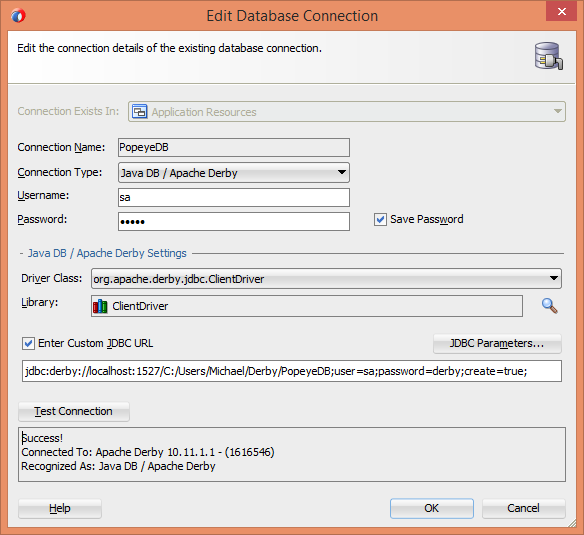
Often times when I click the Test Connection button, it does fail and I don't know why.
Do you ?
I've tested the using nothing but a couple of console windows and the IJ> commends
with both an Embedded connection and a Client connection. Success.
I do believe my environment is fine...
C:\Users\Michael>sysinfo
------------------ Java Information ------------------
Java Version: 1.8.0_51
Java Vendor: Oracle Corporation
Java home: C:\PF\Java\jdk1.8.0_51
Java classpath: C:\PF\Java\jdk1.8.0_51\db/lib/derby.jar;C:\PF\Java\jdk1.8.0_51\db/lib/derbynet.jar;C:\PF\Java\jdk1.8.0_51\db/lib/derbyclient.jar;C:\PF\Java\jdk1.8.0_51\db/lib/derbytools.jar;C:\PF\Java\jdk1.8.0_51\db/lib/derb
yoptionaltools.jar
OS name: Windows 8.1
OS architecture: amd64
OS version: 6.3
Java user name: Michael
Java user home: C:\Users\Michael
Java user dir: C:\Users\Michael
java.specification.name: Java Platform API Specification
java.specification.version: 1.8
java.runtime.version: 1.8.0_51-b16
--------- Derby Information --------
[C:\PF\Java\jdk1.8.0_51\db\lib\derby.jar] 10.11.1.2 - (1629631)
[C:\PF\Java\jdk1.8.0_51\db\lib\derbytools.jar] 10.11.1.2 - (1629631)
[C:\PF\Java\jdk1.8.0_51\db\lib\derbynet.jar] 10.11.1.2 - (1629631)
[C:\PF\Java\jdk1.8.0_51\db\lib\derbyclient.jar] 10.11.1.2 - (1629631)
[C:\PF\Java\jdk1.8.0_51\db\lib\derbyoptionaltools.jar] 10.11.1.2 - (1629631)
C:\\Users\\Michael>
However, when I start JDeveloper, I don't see anything in the log ( or a pop up console )
window to indicate "Apache Derby Network Server" is "started and ready to accept connections
on port 1527".
Instead, I see this...
Apr 25, 2016 2:58:51 PM oracle.security.jps.util.JpsUtil disableAudit
INFO: JpsUtil: isAuditDisabled set to true
Apr 25, 2016 2:58:52 PM oracle.security.jps.util.JpsUtil disableAudit
INFO: JpsUtil: isAuditDisabled set to true
Next, I used the Data Modeler to reveal more information.
6.2.5 How to Test Master-Detail Coordination
Developing Fusion Web Applications With Oracle ADF
Chapter 6 Defining Master-Detail Related View Objects
6.2.5 How to Test Master-Detail Coordination
https://docs.oracle.com/middleware/1221/adf/develop/GUID-42A04C1B-311B-45CC-99A6-0F7D14717FA3.htm#ADFFD23717
MODEL | APPLICATION SOURCES | AMANTI.PPY.MODEL | APPMODULE | run
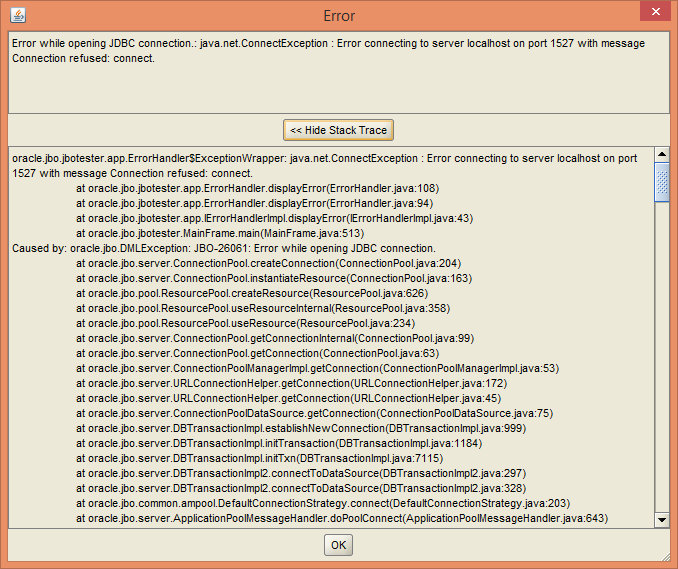
I've deleted and recreated my domain a few times
Window | Application Servers | Create Default Domain
Not sure what to do next, except cry for help :-)
Your thoughts would most certainly be appreciated.
Michael