Hello,
I am using SUSE Linux Enterprise Server 11 SP4 and I used the following guide to install and configure Oracle Grid (12.2.1) and Oracle Database 12c Release 1 (12.1.0.2):
http://www.idevelopment.info/data/Oracle/DBA_tips/Linux/LINUX_22.shtml
Installation of Oracle Grid as well as the installation of the Database software finished without issues. Unfortunately the creation of a new database is producing some warnings during the database creation process:
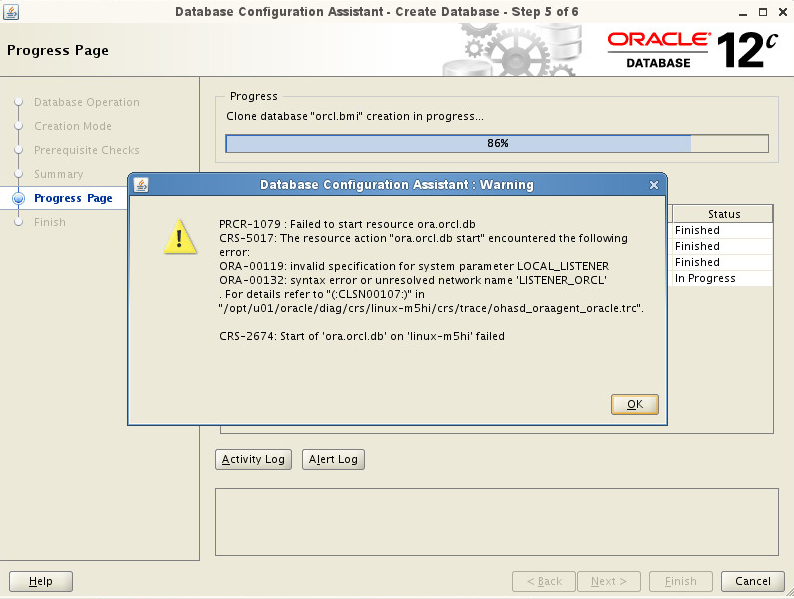
I am providing you the contents of the following files, so you can see how the setup looks like:
listener.ora:
# listener.ora Network Configuration File: /opt/u01/oracle/product/12.2.1/grid/network/admin/listener.ora
# Generated by Oracle configuration tools.
LOCAL_LISTENER =
(DESCRIPTION_LIST =
(DESCRIPTION =

  (ADDRESS = (PROTOCOL = TCP)(HOST = localhost)(PORT = 1522))

  (ADDRESS = (PROTOCOL = IPC)(KEY = EXTPROC1522))

)
)
tnsnames.ora:
# tnsnames.ora Network Configuration File: /opt/u01/oracle/product/12.2.1/grid/network/admin/tnsnames.ora
# Generated by Oracle configuration tools.
LISTENER_ORCL =
(ADDRESS = (PROTOCOL = TCP)(HOST = localhost)(PORT = 1522))
ORCL =
(DESCRIPTION =
(ADDRESS = (PROTOCOL = TCP)(HOST = localhost)(PORT = 1522))

(CONNECT\_DATA =

  (SERVER = DEDICATED)

  (SERVICE\_NAME = orcl.dbtest)

)
)
and the .bash_profile:
# ---------------------------------------------------
# .bash_profile
# ---------------------------------------------------
# OS User: oracle
# Application: Oracle Database Software Owner
Oracle Grid Infrastructure for a
Standalone Server
# Version: Oracle 12c Release 1 (12.1.0.2)
# ---------------------------------------------------
# Get the aliases and functions
if [ -f ~/.bashrc ]; then
  . ~/.bashrc

  fi

  alias ls="ls -FA"

  # ---------------------------------------------------

  # ORACLE\_SID

  # ---------------------------------------------------

  # Specifies the Oracle system identifier (SID) for

  # the Oracle instance running on this node. When

  # using RAC, each node must have a unique ORACLE\_SID.

  # (i.e. racdb1, racdb2,...)

  # ---------------------------------------------------

  ORACLE\_SID=orcl.dbtest; export ORACLE\_SID

  # ---------------------------------------------------

  # ORACLE\_UNQNAME and ORACLE\_HOSTNAME

  # ---------------------------------------------------

  # In previous releases of Oracle Database, you were

  # required to set environment variables for

  # ORACLE\_HOME and ORACLE\_SID to start, stop, and

  # check the status of Enterprise Manager. With

  # Oracle Database 11g Release 2 (11.2) and later, you

  # need to set the environment variables ORACLE\_HOME,

  # ORACLE\_UNQNAME, and ORACLE\_HOSTNAME to use

  # Enterprise Manager. Set ORACLE\_UNQNAME equal to

  # the database unique name and ORACLE\_HOSTNAME to

  # the hostname of the machine.

  # ---------------------------------------------------

  ORACLE\_UNQNAME=orcl.dbtest; export ORACLE\_UNQNAME

  ORACLE\_HOSTNAME=localhost; export ORACLE\_HOSTNAME

  # ---------------------------------------------------

  # JAVA\_HOME

  # ---------------------------------------------------

  # Specifies the directory of the Java SDK and Runtime

  # Environment.

  # ---------------------------------------------------

  JAVA\_HOME=/usr/local/java; export JAVA\_HOME

  # ---------------------------------------------------

  # ORACLE\_BASE

  # ---------------------------------------------------

  # Specifies the base of the Oracle directory structure

  # for Optimal Flexible Architecture (OFA) compliant

  # database software installations.

  # ---------------------------------------------------

  ORACLE\_BASE=/opt/u01/oracle; export ORACLE\_BASE

  # ---------------------------------------------------

  # ORACLE\_HOME

  # ---------------------------------------------------

  # Specifies the directory containing the Oracle

  # Database software.

  # ---------------------------------------------------

  ORACLE\_HOME=$ORACLE\_BASE/product/12.1.0.2/dbhome\_1; export ORACLE\_HOME

  # ---------------------------------------------------

  # GRID\_HOME

  # ---------------------------------------------------

  # Specifies the directory containing the

  # Oracle Grid Infrastructure for a Standalone Server.

  # ---------------------------------------------------

  GRID\_HOME=$ORACLE\_BASE/product/12.2.1/grid; export GRID\_HOME

  # ---------------------------------------------------

  # ORACLE\_PATH

  # ---------------------------------------------------

  # Specifies the search path for files used by Oracle

  # applications such as SQL\*Plus. If the full path to

  # the file is not specified, or if the file is not

  # in the current directory, the Oracle application

  # uses ORACLE\_PATH to locate the file.

  # This variable is used by SQL\*Plus, Forms and Menu.

  # ---------------------------------------------------

  ORACLE\_PATH=/opt/u01/oracle/dba\_scripts/sql:$ORACLE\_HOME/rdbms/admin; export ORACLE\_PATH

  # ---------------------------------------------------

  # SQLPATH

  # ---------------------------------------------------

  # Specifies the directory or list of directories that

  # SQL\*Plus searches for a login.sql file.

  # ---------------------------------------------------

  # SQLPATH=/u01/app/oracle/dba\_scripts/sql; export SQLPATH

  # ---------------------------------------------------

  # ORACLE\_TERM

  # ---------------------------------------------------

  # Defines a terminal definition. If not set, it

  # defaults to the value of your TERM environment

  # variable. Used by all character mode products.

  # ---------------------------------------------------

  ORACLE\_TERM=xterm; export ORACLE\_TERM

  # ---------------------------------------------------

  # NLS\_DATE\_FORMAT

  # ---------------------------------------------------

  # Specifies the default date format to use with the

  # TO\_CHAR and TO\_DATE functions. The default value of

  # this parameter is determined by NLS\_TERRITORY. The

  # value of this parameter can be any valid date

  # format mask, and the value must be surrounded by

  # double quotation marks. For example:

  #

  #         NLS\_DATE\_FORMAT = "MM/DD/YYYY"

  #

  # ---------------------------------------------------

  NLS\_DATE\_FORMAT="DD-MON-YYYY HH24:MI:SS"; export NLS\_DATE\_FORMAT

  # ---------------------------------------------------

  # TNS\_ADMIN

  # ---------------------------------------------------

  # Specifies the directory containing the Oracle Net

  # Services configuration files like listener.ora,

  # tnsnames.ora, and sqlnet.ora. When using Oracle

  # ASM, the TNS listener will be run out of

  # GRID\_HOME; otherwise the listener will be run out

  # ORACLE\_HOME.

  # ---------------------------------------------------

  # TNS\_ADMIN=$ORACLE\_HOME/network/admin; export TNS\_ADMIN

  TNS\_ADMIN=$GRID\_HOME/network/admin; export TNS\_ADMIN

  # ---------------------------------------------------

  # ORA\_NLS11

  # ---------------------------------------------------

  # Specifies the directory where the language,

  # territory, character set, and linguistic definition

  # files are stored.

  # ---------------------------------------------------

  ORA\_NLS11=$ORACLE\_HOME/nls/data; export ORA\_NLS11

  # ---------------------------------------------------

  # PATH

  # ---------------------------------------------------

  # Used by the shell to locate executable programs;

  # must include the $ORACLE\_HOME/bin directory.

  # ---------------------------------------------------

  PATH=.:${JAVA\_HOME}/bin:$JAVA\_HOME/db/bin:${PATH}:$HOME/bin:$ORACLE\_HOME/bin

  PATH=${PATH}:/usr/bin:/bin:/usr/bin/X11:/usr/local/bin

  PATH=${PATH}:/opt/u01/oracle/dba\_scripts/bin

  export PATH

  # ---------------------------------------------------

  # LD\_LIBRARY\_PATH

  # ---------------------------------------------------

  # Specifies the list of directories that the shared

  # library loader searches to locate shared object

  # libraries at runtime.

  # ---------------------------------------------------

  LD\_LIBRARY\_PATH=$ORACLE\_HOME/lib

  LD\_LIBRARY\_PATH=${LD\_LIBRARY\_PATH}:$ORACLE\_HOME/oracm/lib

  LD\_LIBRARY\_PATH=${LD\_LIBRARY\_PATH}:/lib:/usr/lib:/usr/local/lib

  export LD\_LIBRARY\_PATH

  # ---------------------------------------------------

  # CLASSPATH

  # ---------------------------------------------------

  # The class path is the path that the Java runtime

  # environment searches for classes and other resource

  # files. The class search path (more commonly known

  # by the shorter name, "class path") can be set using

  # either the -classpath option when calling a JDK

  # tool (the preferred method) or by setting the

  # CLASSPATH environment variable. The -classpath

  # option is preferred because you can set it

  # individually for each application without affecting

  # other applications and without other applications

  # modifying its value.

  # ---------------------------------------------------

  CLASSPATH=.:$ORACLE\_HOME/jdbc/lib/ojdbc6.jar

  CLASSPATH=${CLASSPATH}:$ORACLE\_HOME/jlib:$ORACLE\_HOME/rdbms/jlib

  CLASSPATH=${CLASSPATH}:$ORACLE\_HOME/network/jlib

  export CLASSPATH

  # ---------------------------------------------------

  # THREADS\_FLAG

  # ---------------------------------------------------

  # All the tools in the JDK use green threads as a

  # default. To specify that native threads should be

  # used, set the THREADS\_FLAG environment variable to

  # "native". You can revert to the use of green

  # threads by setting THREADS\_FLAG to the value

  # "green".

  # ---------------------------------------------------

  THREADS\_FLAG=native; export THREADS\_FLAG

  # ---------------------------------------------------

  # TEMP, TMP, and TMPDIR

  # ---------------------------------------------------

  # Specify the default directories for temporary

  # files; if set, tools that create temporary files

  # create them in one of these directories.

  # ---------------------------------------------------

  export TEMP=/tmp

  export TMPDIR=/tmp

  # ---------------------------------------------------

  # UMASK

  # ---------------------------------------------------

  # Set the default file mode creation mask

  # (umask) to 022 to ensure that the user performing

  # the Oracle software installation creates files

  # with 644 permissions.

  # ---------------------------------------------------

  umask 022
According to this article (http://dba-oracle.com/bk_ora_00119.htm) I decided to modify the SPFILE/PFILE. First I tried to get an overview which files are located in ASM by using the command asmcmd. After entering asmcmd no command (for example: ls, cd, ..) was working. After some research I changed the following parameters:
export ORACLE_HOME=/opt/u01/oracle/product/12.2.1/grid
export PATH=$ORACLE_HOME/bin
export ORACLE_SID=+ASM
After changing the parameters the commands are working now. In /DATA/ there are the following files which I can find:
/DATA/ASM/ASMPARAMETERFILE/REGISTRY.xxx.xxxxxxxxx
/DATA/ORCL/PARAMETERFILE/spfile.xxx.xxxxxxxxx
According to this article https://juniororacledba.wordpress.com/tag/create-pfile-from-spfile/ I checked the location of the spfile:
SQL> show parameter spfile
NAME TYPE VALUE
---------------------------------------------------------------------------------------------
spfile string +DATA/ASM/ASMPARAMETERFILE/registry.253.937097749
I was surprised of the result, because I was expecting to find the SPFILE in the folder ORCL instead. But I tried to continue and create a PFILE from the SPFILE with the following command:
SQL> CREATE PFILE='/home/oracle/my_init.ora' FROM SPFILE'+DATA/ASM/ASMPARAMETERFILE/REGISTRY.253.937097749'
After hitting enter a new line shows up with the number "2" and waiting for some input from my end I think. Hitting again enter it finishes, but no PFILE was created.
Anyway is the started approach to fix this warning the correct one? If you think yes then what should I do to edit the SPFILE successfully
Best regards
1stone