Hi,
I've set up a simple data load definition to allow users to
(1) Copy and paste CSV data into a text area
(2) Preview the uploaded data
(3) Push the data into a table using process type "Data Loading"
Steps (1) and (3) work just fine, as defined in the data load definition. However, Step (2) Does not display computed data profile columns for a preview. I have a column that derives its value based on other data columns.
In this example, I've set up the ItemPrice should be ItemCost * 2 (real-life data has multiple SQL Expressions and have the same effect)
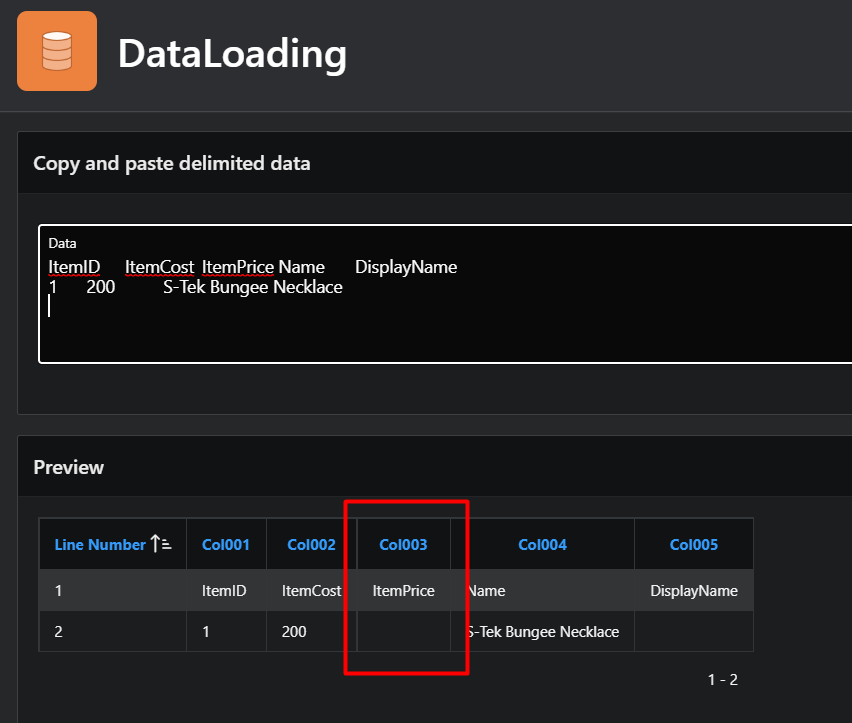
I'm afraid this is expected behavior (and I hope I'm wrong and just missed something obvious), however, I believe it would be much more useful if the preview could display the computed columns allowing users to perform any corrections before loading the final data set.
Here is my SQL for preview:
select p.line_number,
       p.col001, p.col002, p.col003, p.col004, p.col005

  from table( apex_data_parser.parse(
                  p_content           => to_blob(sys.utl_raw.cast_to_raw( :P1_DATA )),
                  p_file_name         => 'pasted_data.csv',
                  p_file_profile      => apex_data_loading.get_file_profile( p_static_id => 'LOAD_Item_Scuba'),
                  p_max_rows          => 100 )
            ) p
APEX workspace sample app:
OARS/DEMO/3FM$DhVa42du4xw
Appreciate any input on how to display the computed data profile columns in the preview stage.
Best Regards,
-Senthil