Hi Experts,
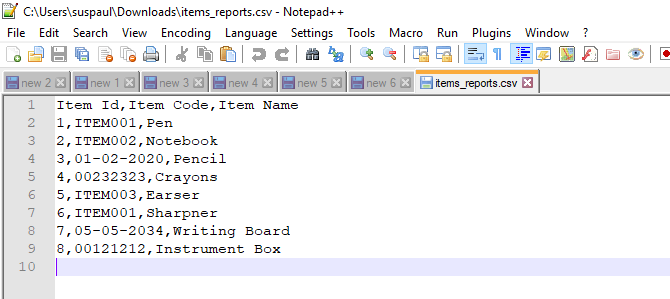
I have an Oracle APEX Report which I am downloading on click of a button. In the Report we have some data under the ITEM_CODE column as ITEM002, 01-02-2020, 00121212.
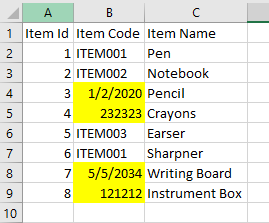
After the data is downloaded, if I open the csv file in Notepad, or Notepad++, I am able to see the data in correct format. However, when I open the downloaded CVS file using the Microsoft Office the data of the ITEM_ID column is displayed something differently, say 01-02-2020 is getting displayed as 1/1/2020, 00121212 is getting displayed as 121212.
My requirement is when we open the CSV file using Microsoft Office still it should preserve the data format. Any guidance to solve this issue will be of great help.
CSV file data when opened in Notepad++
CSV file data when opened in Microsoft Office. The yellow highlighted data is displayed in different format.
The PL/SQL code to download the CSV file is as below:
BEGIN
owa\_util.mime\_header('application/octet', false);

htp.p('Content-Disposition: attachment; filename="items\_data.csv"');

owa\_util.http\_header\_close;

htp.prn('ITEM\_ID'

        || ','

        || 'ITEM\_CODE'

        || ','

        || 'ITEM\_NAME'

        || chr(13));

FOR x IN (

    SELECT

        item\_id,

        item\_code,

        item\_name

    FROM

        items

) LOOP

    htp.prn('"'

            || x.item\_id

            || '","'

            || x.item\_code

            || '","'

            || x.item\_name

            || '"'

            || chr(13));

END LOOP;

htmldb\_application.g\_unrecoverable\_error := true;
END;
Sample SQL code to create ITEMS table is:
CREATE TABLE items (
item\_id    NUMBER PRIMARY KEY,

item\_code  VARCHAR2(20),

item\_name  VARCHAR2(20)
)
Few INSERT statement to insert data in ITEMS table are:
INSERT INTO items VALUES(1, 'ITEM001', 'Pen');
INSERT INTO items VALUES(2, 'ITEM002', 'Notebook');
INSERT INTO items VALUES(3, '01-02-2020', 'Pencil');
INSERT INTO items VALUES(4, '00232323', 'Crayons');
INSERT INTO items VALUES(5, 'ITEM003', 'Earser');
INSERT INTO items VALUES(6, 'ITEM001', 'Sharpner');
INSERT INTO items VALUES(7, '05-05-2034', 'Writing Board');
INSERT INTO items VALUES(8, '00121212', 'Instrument Box');
Sample Application Link: https://apex.oracle.com/pls/apex/paul_technotrainings/r/csvdownload/items-report?session=106610522973894
username: demo
password: Demo@123
Thanks & Regards,
Susanto Paul