In FSCM 9.2, Tools 8.56 I have enabled Alerts via Events & Notifications (Main Menu --> Enterprise Components --> Events & Notifications --> Alerts --> Alert Definition). We are using the delivered 'EOEN' Event Name and emails get triggered based off a PS Query running, which is run by an App Engine process called EOEN_ALERT. The following is an example of the delivered email that is generated:
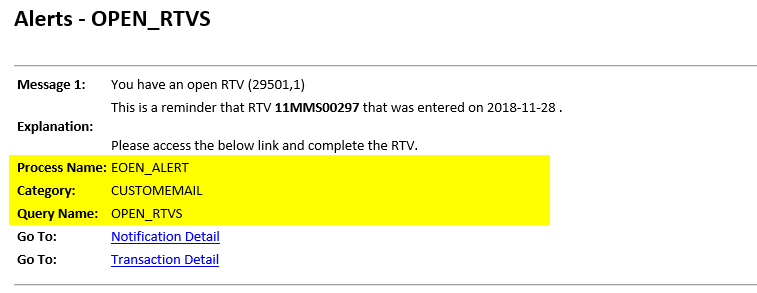
I would like to remove the text within the highlighted area as it isn't useful to end users and clutters the message. From some documentation I found online there is code inside the Application Class EOEN_MVC.EOEN_MODEL.EoenNotificationByEmail.OnExecute that is controlled by an HTML object named EOEN_EMAIL_TEXT.

Application Class Method:

I have modified this HTML object a few times, ran the alert process, and saw that the content of the email did not change at all. I even removed all of the HTML markup inside this HTML object, ran the alert process again, and it still generates the original email and formatting.
I then removed some of the bind variables within EOEN_MVC.EOEN_MODEL.EoenNotificationByEmail.OnExecute and even commented the above highlighted code completely (expecting some sort of error to occur) and to my surprise the process still ran successfully and generated the entire email with original content. What am I missing? Has anyone else modified this successfully?