We have 2 custom buttons in the interactive grid, ‘Resequence’ and ‘Save to Database’ both execute the interactive grids save function. Based on the page item P1_SAVE_TO_DB, if N (Resequence) should save grid data to the collection and if P1_SAVE_TO_DB is Y (Save to Database) then saves the grid data to the collection and database table too.
Sometimes we will click Resequence to make sure we have the data in the order we need and click ‘Save to Database’. In this case P1_SAVE_TO_DB variable is not being set because we haven’t made any changes to the grid after we clicked Resequence and ‘Save to Database’ functionality is not working.
Wondering how to get around this. Thanks much for your help!
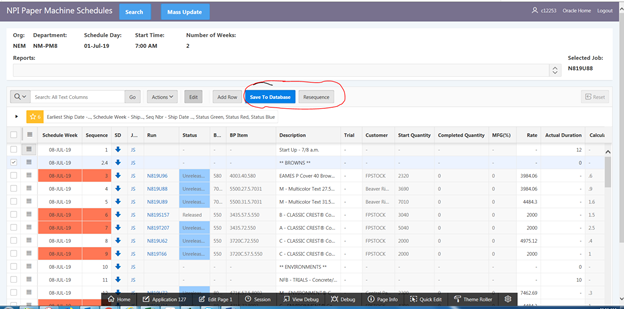
function( config ) {
var $ = apex.jQuery,

toolbarData = $.apex.interactiveGrid.copyDefaultToolbar(),

toolbarGroup = toolbarData.toolbarFind("actions3"); // this is the group with the action=add row
toolbarGroup.controls.push({type: "BUTTON",
                            action: "save-to-db",

                            hot: true

                           });
toolbarGroup.controls.push({type: "BUTTON",
                            action: "resequence"

                           });

config.toolbarData = toolbarData;

    config.initActions = function( actions ) {
/*$s("P1_SAVE_TO_DB", "N");
actions.lookup( "save" ).label = "Reseqence";*/
    actions.add(\[

    {

        name: "resequence",

        label: "Resequence",

        action: function()

        {

          $s("P1\_SAVE\_TO\_DB", "N");

          var save = actions.lookup("save"),

          saveFn = save.action;
saveFn();
        }

      }\]);

    actions.add(\[

    {

        name: "save-to-db",

        label: "Save To Database",

        action: function()

        { //var wp = apex.widget.waitPopup();
$s("P1_SAVE_TO_DB", "Y");
          var save = actions.lookup("save"),

          saveFn = save.action;

          saveFn();

        }        }\]);

};
return config;
}
Thanks,
P.