APEX 23.2
Oracle DB 19c
I have an application and I want to switch it to the Universal Theme (I didn't select it in the application creation wizard). I need to add it to the application. Here are the steps in the UT Migration guide for V23.2.
T_o create Universal Theme in your application, go to Shared Components, click on Themes and follow the steps below:_
Note: If you have already installed the Universal Theme into your application, proceed to the Second Step: Switch to Universal Theme.
- Click Create Theme
You need to install the Universal Theme into your application to get started.
2. Select From the Repository.
3. Select Desktop as the User Interface.
4. Choose Standard Themes as the Theme Type, and Universal Theme (Theme 42) as the Theme.
Review your changes and click Create.
Here are the options for Create Theme in the APEX Builder
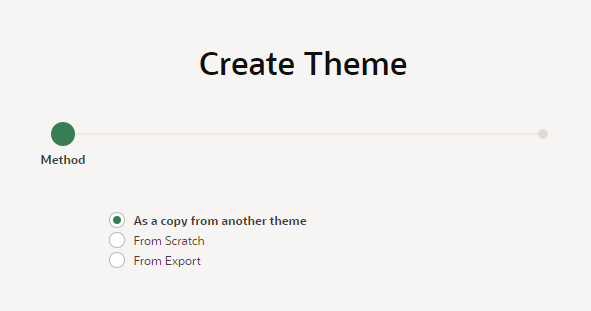
There is no option for "Select From the Repository."
Either the doco is out of date or the option is missing from the APEX builder. Which is correct ?
If the doco is out of date then how do I create the UT42 in my application? (assuming I didn't select it in the application creation wizard)
PaulP