Grid Infra version : 11.2.0.4
RDBMS Version : 11.2.0.4
OS : Oracle Linux 6.4
I had a perfectly running RDBMS Software Home as shown below. And I had a 2-node RAC DB running from this ORACLE_HOME.
oracle’s ORACLE BASE=/dboracle/product
RDBMS_HOME: /dboracle/product/oracle/11.2.0
Central inventory location: /dboracle/product/oraInventory
Luckily Grid Infrastructure was running from separate mount point:
grid ORACLE BASE=/grid/app
grid ORACLE_HOME=/grid/product/11.2.0
Then yesterday, the filesystem with the mount point /dboracle got corrupted !!! Our Linux team tried to repair the filesystem, but we still couldn't start the DB. But, the contents in Oracle Inventory ( /dboracle/product/oraInventory ) seemed to be intact.
So, I wanted to install a New RDBMS_HOME and wanted to start the DB from there. But , i got the following error from runInstaller.
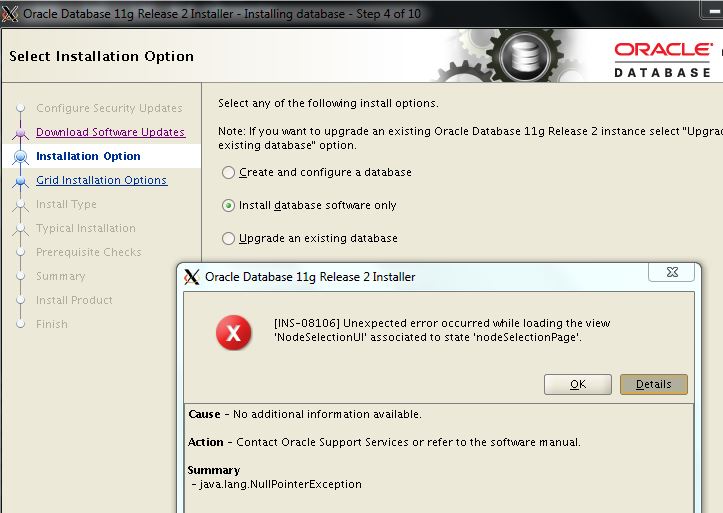
So, we sought oracle's support. After trying several options , the provided the following fix , which worked.
Fix:
Step1
So, Oracle Support asked to copy the RDBMS_HOME from another RAC DB server (different cluster) and copy it to the same location in this machine, which is /dboracle/product/oracle/11.2.0
Step2.
Then we ran $ORACLE_HOME/bin/relink all
And everything seems to be working fine !!!! I mean, I can start/stop database using RDBMS_HOME/bin/srvctl . crsctl status resource -t output shows DB resource to be ONLINE state.
I get one error message related to getcrshome whenever I run srvctl though. Its because the directory path missed 'oracle' directory. Don't know why it it got the path wrong. Other than this everything is working fine.
[oracle@emsdbp181 ~]$ srvctl status database -d ORCL
/dboracle/product/oracle/11.2.0/bin/srvctl: line 208: /dboracle/product/11.2.0/srvm/admin/getcrshome: No such file or directory
Instance ORCL1 is running on node emsdbp181
Instance ORCL2 is running on node emsdbp182
Question1. How did this copy-pasted RDBMS HOME become RAC aware ?
Question2. Since the RDBMS directory , which is copied, is from another server (source server) , it will have server names of the source server. Won't this cause any problem ?