Hi,
I am trying to format rows in a classic report based on the value of one column.
What I have successfully done is:
- Bold the font if a column is a certain value
- Put a % sign at the end if a column is a certain value
I did this by adding case statements to the region definition SQL statement and creating two hidden columns called FONT and PER then referencing them in the HTML Expression of each column attribute:


The last thing I need to do is put a different format mask on in the same way.
- Some values need this format mask (comma separated, showing no decimals): 999G999G999G999G999G999G990
- Some need this format mask (showing 1 decimal place): 999G999G999G999G990D00 **these are the same ones I applied the % sign to
How can I accomplish this without applying the same format mask to the entire column?
What I have:
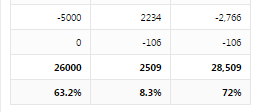
What' I'm trying to accomplish:
 *** Ignore the color highlighting. Just looking to have comma separation and no decimals for the top 3 rows, and decimals with a % sign on the bottom row.
Thank you!