I have a bounded taskflow implemented as a region. The task flow begins by calling a CreateInsert method which makes an input form blank (new_booking page fragment on the task flow below).
User can commit or rollback transaction using the task flow return (rollback or commit). These two (rollback and commit) are implemented as buttons on the input form.
The issue I am having is, when I click on rollback button, the previous existing data in the view object is shown on the form fields.
I would like to have a blank form when I click on rollback button. Also, after closing the input form, when I reopen the it again, it should come up as blank but currently it comes filled with previously existing data.
Below is the task flow diagram;

Below is the task flow code;
<?xml version="1.0" encoding="windows-1252" ?>
<adfc-config xmlns="http://xmlns.oracle.com/adf/controller" version="1.2">
<task-flow-definition id="task-flow-definition_create_new_booking">
\<default-activity>CreateInsert\</default-activity>

\<transaction>

  \<new-transaction/>

\</transaction>

\<data-control-scope>

  \<shared/>

\</data-control-scope>

\<method-call id="CreateInsert">

  \<method>#{bindings.CreateInsert.execute}\</method>

  \<outcome>

    \<fixed-outcome>CreateInsert\</fixed-outcome>

  \</outcome>

\</method-call>

\<view id="new\_booking">

  \<page>/new\_booking.jsff\</page>

\</view>

\<task-flow-return id="Rollback">

  \<outcome>

    \<name>taskFlowReturn1\</name>

    \<rollback/>

  \</outcome>

\</task-flow-return>

\<task-flow-return id="Commit">

  \<outcome>

    \<name>Commit\</name>

    \<commit/>

  \</outcome>

\</task-flow-return>

\<control-flow-rule id="\_\_1">

  \<from-activity-id>CreateInsert\</from-activity-id>

  \<control-flow-case id="\_\_2">

    \<from-outcome>CreateInsert\</from-outcome>

    \<to-activity-id>new\_booking\</to-activity-id>

  \</control-flow-case>

\</control-flow-rule>

\<control-flow-rule id="\_\_13">

  \<from-activity-id>new\_booking\</from-activity-id>

  \<control-flow-case id="\_\_3">

    \<from-outcome>rollback\</from-outcome>

    \<to-activity-id>Rollback\</to-activity-id>

  \</control-flow-case>

  \<control-flow-case id="\_\_8">

    \<from-outcome>commit\</from-outcome>

    \<to-activity-id>Commit\</to-activity-id>

  \</control-flow-case>

\</control-flow-rule>

\<use-page-fragments/>
</task-flow-definition>
</adfc-config>
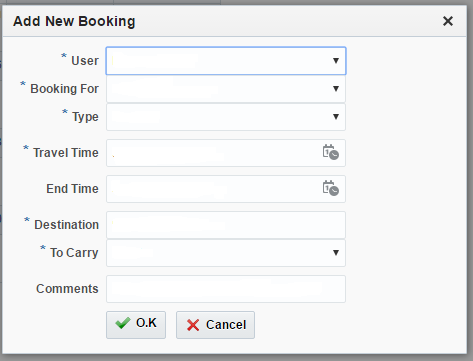
The input form (popup that has a panel form) is shown below;
What possibly am I not doing right?