Below is the code which is creating duplicate labels in checkbox set.
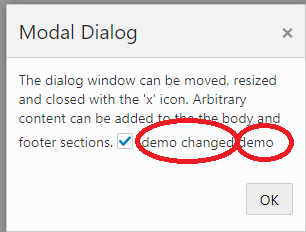
i used below cookbook demo to reproduce issue
https://www.oracle.com/webfolder/technetwork/jet/jetCookbook.html?component=dialog&demo=modal
require(['ojs/ojcore', 'knockout', 'jquery', 'ojs/ojknockout', 'ojs/ojbutton', 'ojs/ojdialog','ojs/ojcheckboxset'],
function (oj, ko, $) {

  function viewModel() {

    var self = this;
self.pinkDCount = ko.observableArray();
     self.agree = ko.observableArray(\['agree'\]);

  var rrr = {};

  rrr\['name'\] = 'demo';
self.pinkDCount(rrr);
    self.close = function (event) {

      document.getElementById('modalDialog1').close();

    }

    self.open = function (event) {

      self.pinkDCount(\[\]);

      var aa = {};

  aa\['name'\] = 'demochanged';
self.pinkDCount(aa);
      document.getElementById('modalDialog1').open();

    }

  }

  ko.applyBindings(new viewModel, document.getElementById('dialogWrapper'));

});
<html lang="en-us" style="height:100%;" dir="ltr">
<body class="demo-disable-bg-image">
\<div id="sampleDemo" style="" class="demo-padding demo-container">

  \<div id="componentDemoContent" style="width: 1px; min-width: 100%;">

    \<div id="dialogWrapper">

      \<oj-dialog style="display:none" id="modalDialog1" dialog-title="Modal Dialog">

        \<div slot="body">

          The dialog window can be moved, resized and closed with the 'x' icon.

          Arbitrary content can be added to the the body and footer sections.

          \<oj-checkboxset id="checkboxSetAgreeId" labelled-by="agreeId"

                value="\[\[agree\]\]"

                required >

            \<oj-option id="agree" value="agree">

            \<!-- ko with : pinkDCount  -->

              \<!-- ko text : name -->\<!-- /ko -->

              \<!-- /ko -->

            \</oj-option>

          \</oj-checkboxset>

        \</div>

        \<div slot="footer">

          \<oj-button id="okButton" on-oj-action="\[\[close\]\]">OK

          \</oj-button>

        \</div>

      \</oj-dialog>

      \<oj-button id="buttonOpener" on-oj-action="\[\[open\]\]">

        Open Modal Dialog

      \</oj-button>

    \</div>

  \</div>

\</div>
</body>
</html>