Hi all,
I am currently working with Application Express 19.1.0.00.15.
I am looking for information on the best technique to change cell fonts in an Interactive grid.
This is possible farly easily in Interactive Reports and numerous sites provide information on how to go about this.
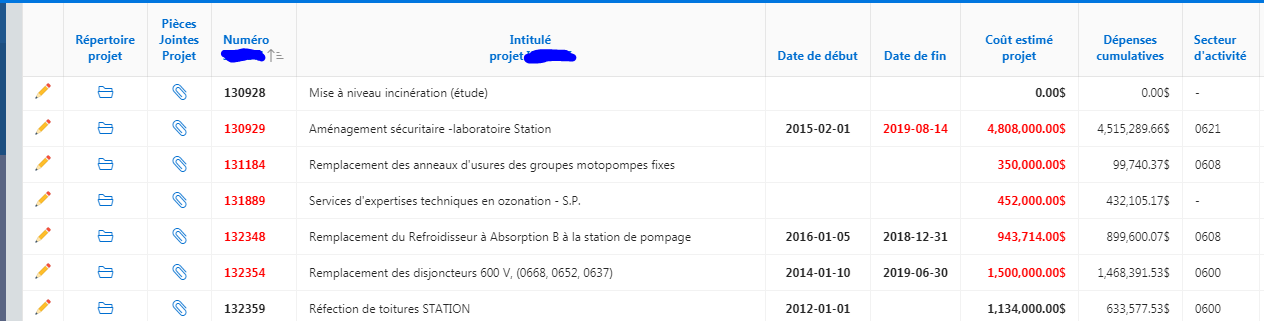
Below is a typical Interactive Report I have where cell fonts are changed to bold-red when there is an issue with the data.
Here is the code used in SQL to produce the results:
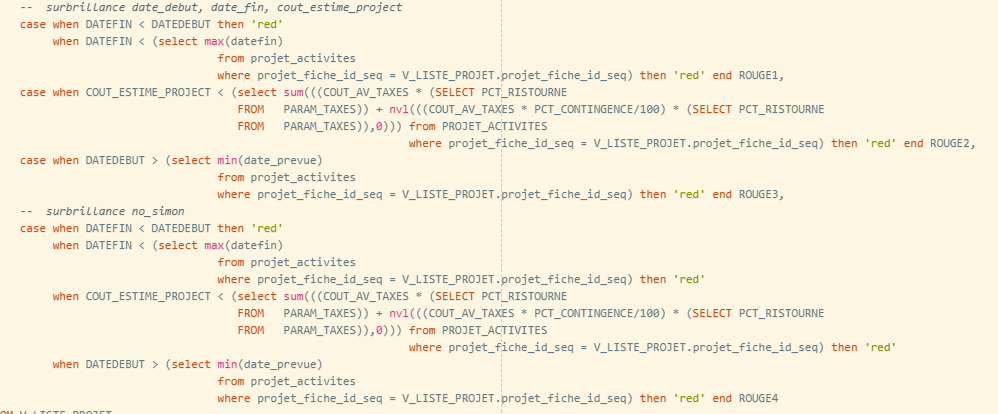
and one of the html Column Formatting entry used <span style="white-space:nowrap;color:#ROUGE1#;font-weight:bold;">#DATEFIN#</span>
I need to reproduce this exact behavior in an Interactive Grid but it appears that the technique I used in the Interactive Report is not usable in Interactive Grids.
Any information, tips, suggestion on how I can go about doing this in and Interactive Grid would be greatly appreciated.
Thanks,
Jake