Bar chart has three series that I've configured APEX to stack. The stack is working correctly, however the width of the chart is the same as if all three columns were not stacked - the stacked bar sits to the far left of the chart.
How do I either center the stacked bar on the chart, OR how do I change the configuration so that it is only wide enough for a single bar, instead of the three bars if it were not stacked?
APEX 20.1
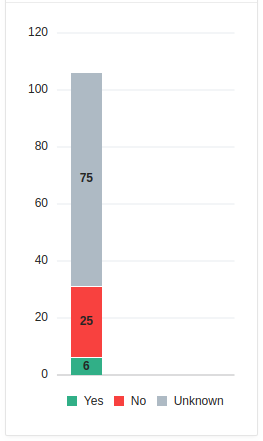 Description of screenshot attached for screen-readers or other non-graphics capable web browsers:
A single stacked bar chart, vertically oriented with three series. Y axis is labeled 0 through 120 with major ticks at 0, 20, 40 etc. X axis is not displayed. Legend at bottom of chart includes "Yes" (green), "No" (red), and "Unknown" (grey). Series one on bottom of stacked bar is green in color, value 6, representing "Yes". Series two in middle of stack is red in color, value 25, representing "No". Series three at top of stack is grey in color, value 75, representing "Unknown". Overall width of the chart object is three times as wide as needed for the singular stacked bar. Single stacked bar sits on far left side of chart object.