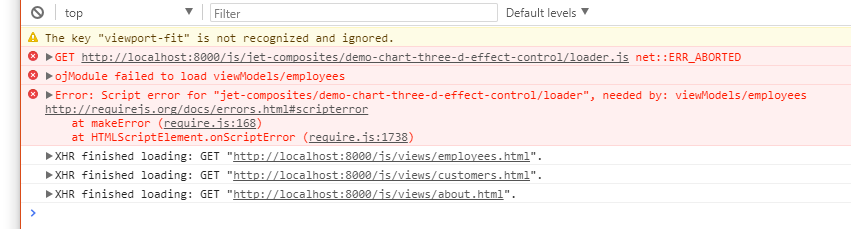
Hi, I'm following the Jet course material for the week 2 and I can't get any of the components working in my modules, I'm must be missing something fundamental.
I was able to create a new JET module employees.js and employees.html. I insert the pie chart code from the JET cookbook, I copy the js code that sets and binds the data, and just get blank div on an employee page and javascript error around require.js. Not sure how to address that, is there a specific version of a require.js that is compatible with JET but not the latest? Please help
Thank you,
Radek
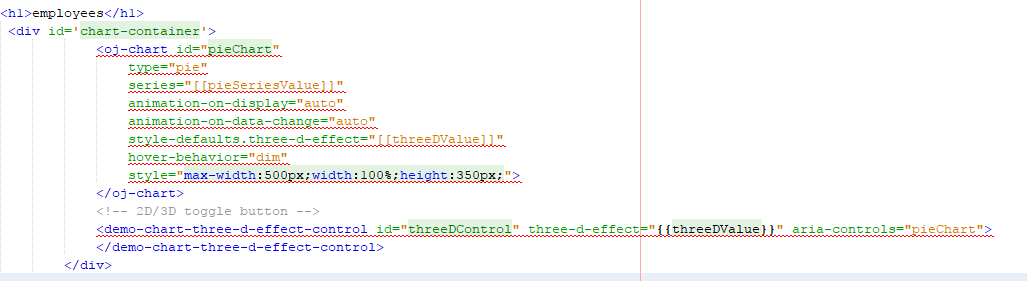
define(['ojs/ojcore', 'knockout', 'jquery', 'ojs/ojknockout', 'ojs/ojbutton', 'ojs/ojchart', 'jet-composites/demo-chart-three-d-effect-control/loader'],
function(oj, ko, $)
{
function EmployeeViewModel() {
var self = this;
self.threeDValue = ko.observable('off');
    /\* chart data \*/
    var pieSeries = \[{name: "Series 1", items: \[42\]},
                     {name: "Series 2", items: \[55\]},
                     {name: "Series 3", items: \[36\]},
                     {name: "Series 4", items: \[10\]},
                     {name: "Series 5", items: \[5\]}\];

    this.pieSeriesValue = ko.observableArray(pieSeries);
}

var employeeViewModel = new EmployeeViewModel();

$(
function(){
ko.applyBindings(employeeViewModel, document.getElementById('chart-container'));
}
);
return employeeViewModel;
});