Skip to Main Content

SQL Developer

Announcement

For appeals, questions and feedback about Oracle Forums, please email oracle-forums-moderators_us@oracle.com. Technical questions should be asked in the appropriate category. Thank you!

Can SQLDeveloper handle closed connections smartly?

rmoffMar 11 2015 — edited May 18 2015

SQL Developer 4.1 EA2 (but has been an issue for years)

When a connection is broken (eg wifi drops, or whatever), SQL Dev throws this error (understandably) when you run a query that was using said connection:
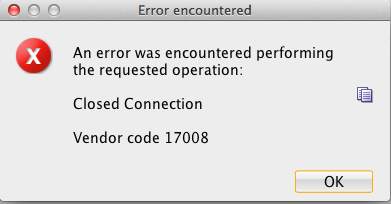
Error_encountered_and_Oracle_SQL_Developer___Long_running_and_or_large_numbers_of_rows_processed_and_or_large_number_of_DB_queries.png

But having said the connection is closed, the UI still shows it as connected:

Oracle_SQL_Developer___Long_running_and_or_large_numbers_of_rows_processed_and_or_large_number_of_DB_queries.png

Choosing "Reconnect" from the Connections pane does nothing, and since the connection is still "active" I can't select it again from the top-right dropdown in order to reconnect.

So, I have to right click on the connection to disconnect, and then Connect again.

Is there a less clunky way to handle this workflow?

thanks.

Comments
Locked Post
New comments cannot be posted to this locked post.
Post Details
Locked on Jun 15 2015
Added on Mar 11 2015
6 comments
1,298 views