In this blog we will look at

Application
The application is a simple one which fetches the price of a stock from the cache. It demonstrates other features (in addition to basic caching) such as
- Cache loader – if the key (stock name) does not exist in the cache (since it was never searched for or has expired), the cache loader logic kicks in and fetches the price using a REST call to an endpoint
- Serializer – Allows us to work with our domain object (Ticker) and takes care of the transformation logic
- Expiry – A cache-level expiry is enforced after which the entry is purged from the cache
- Metrics – get common metrics such as cache size, hits, misses etc.
Code
Let’s look at some code snippets for our application and each of the features mentioned above
Project is available on Github
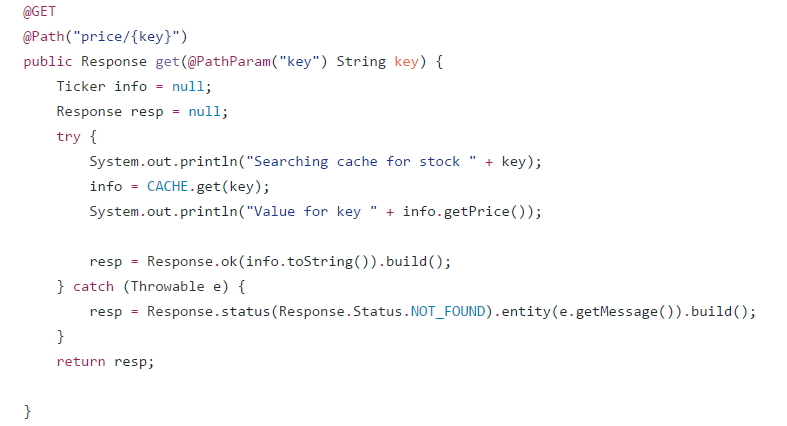
Cache operations
This example exposes the get cache operation over a REST endpoint implemented using Jersey (JAX-RS API)
Cache Loader
PriceLoader.java contains the logic to fetch the price from an external source

Serializer
TickerSerializer.java Converts to and from Ticker.java and its String representation


Expiry
Purges the cache entry when this threshold is hit and causes the cache loader invocation is the expired entry is looked up (get) again

Metrics
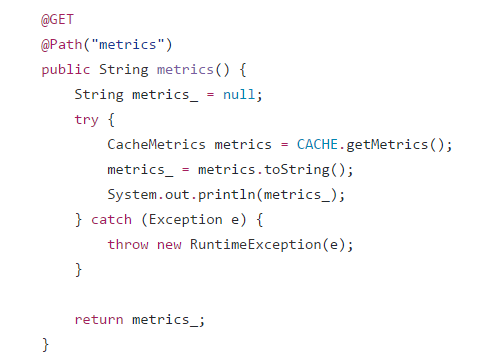
Many cache metrics can be extracted – common ones are exposed over a REST endpoint
Some of the metrics are global and other are not. Please refer to the CacheMetrics javadoc for details
Setup
Oracle Application Container Cloud
The only setup required is to create the Cache. It’s very simple and can be done quickly using the documentation.
Please make sure that the name of the cache is the same as one used in the code and configuration (Developer Cloud) i.e test-cache. If not, please update the references
Oracle Developer Cloud
You would need to configure Developer Cloud for the build as well as Continuous Deployment process. You can refer to previous blogs for the same - some of the details specific to this example will be highlighted here
References
Provide Oracle App Container Cloud (configuration) descriptors
- The manifest,json provided here will override the one in your zip file (if any) - its not compulsory to provide it here
- Providing the deployment.json details is compulsory (in this CI/CD scenario ) since it cannot be included in the zip file

Deployment confirmation in Developer Cloud

Status in Application Container Cloud
Application URL has been highlighted


Test the application
Check price
Invoke a HTTP GET (use curl or browser) to the REST endpoint (check the application URL) e.g. https://acc-cache-dcs-domain007.apaas.us6.oraclecloud.com/price/ORCL

If you try fetching the price of the stock after the expiry (default is 5 seconds), you should see a change in the time attribute (and the price as well - if it has actually changed)
Check cache metrics
Invoke a HTTP GET (use curl or browser) to the REST endpoint (check the application URL) e.g. https://acc-cache-dcs-domain007.apaas.us6.oraclecloud.com/metrics

Test the CI/CD flow
Make some code changes and push them to the Developer Cloud service Git repo. This should
- Automatically trigger the build, which once successful will
- Automatically trigger the deployment process, and
- Redeploy the new application version to Application Container Cloud
Additional reading/references
**The views expressed in this post are my own and do not necessarily reflect the views of Oracle.