The next script can be saved, e.g., as “test.sql,” and successfully executed via SQLcl or SQL*Plus connected as any user. It also works via “Run Script” in VS Code. However, it produces a syntax error in the VS Code extension 25.4.0, which is shown in the PROBLEMS tab.
select any_value(dummy) filter (where dummy = 'X') from dual;
Here's the screenshot showing the complete error message:
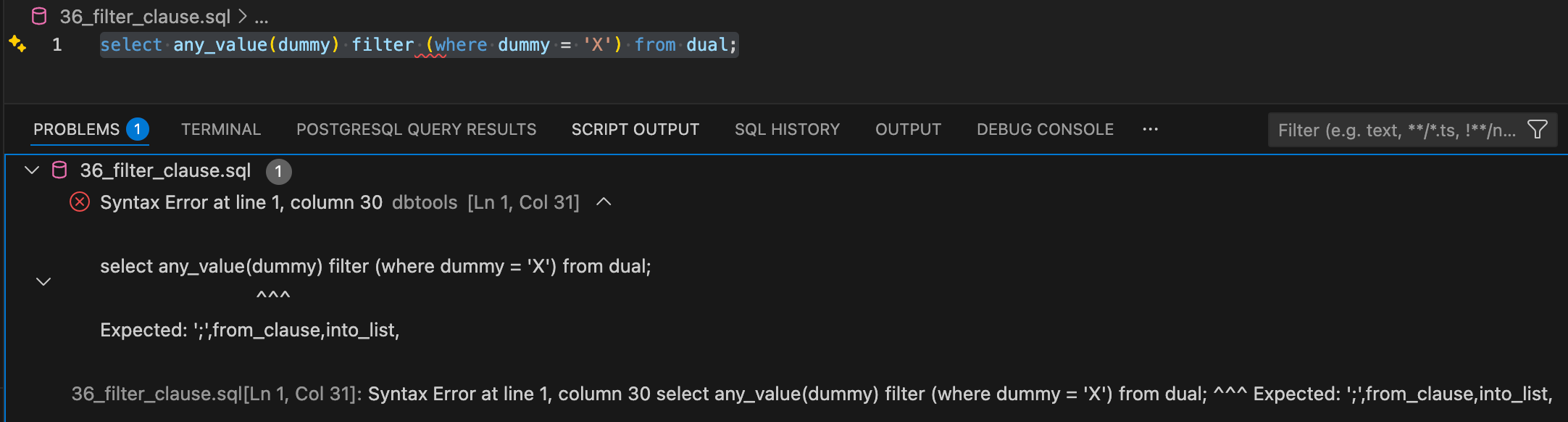
Furthermore, this statement cannot be executed via “Run Statement”. It produces this error message: “An error occurred while running the statement” and in the log “Cannot execute an empty script”.
Here are the related log messages in the “SQL Developer - Log”:
[29/01/26, 22:16:36.239] [DBToolsServerApp(18224)] [DEBUG] 2026-01-29T21:16:36.239Z DEBUG POST /20221610/databases/connections/sessions/-Zsht4nbR1vhK6F_mUqAGg/actions/prepare HTTP/1.1
Host: localhost
Request-Id: ckk2eGPvmeoIm9XUVps2zg
Accept: application/json
Authorization: Signature key***brQ=="
Content-Length: 124
Content-Type: application/json
x-content-sha256: y8bIrejytGgsAI/ZNUKqkLO7Sy9MC09kUogzQs2beoI=
x-date: Thu, 29 Jan 2026 21:16:36 GMT
User-Agent: node-fetch/1.0 (+https://github.com/bitinn/node-fetch)
Accept-Encoding: gzip,deflate
Connection: close
{
"cursorPosition": {
"line": 0,
"character": 61
},
"statementText": "select any_value(dummy) filter (where dummy = 'X') from dual;"
}
[29/01/26, 22:16:36.244] [DBToolsServerApp(18224)] [TRACE] 2026-01-29T21:16:36.244Z TRACE Syntax Error at line 1, column 30
select any_value(dummy) filter (where dummy = 'X') from dual
^^^
Expected: ';',from_clause,into_list,
Syntax Error at line 1, column 30
select any_value(dummy) filter (where dummy = 'X') from dual
^^^
Expected: ';',from_clause,into_list,
at oracle.dbtools.common.arbori@25.4.1/oracle.dbtools.parser.plsql.SyntaxError.checkSyntax(SyntaxError.java:170)
at oracle.dbtools.common.arbori@25.4.1/oracle.dbtools.parser.plsql.SyntaxError.checkSyntax(SyntaxError.java:98)
at oracle.dbtools.common.arbori@25.4.1/oracle.dbtools.parser.plsql.SyntaxError.checkSyntax(SyntaxError.java:91)
at oracle.dbtools.common.arbori@25.4.1/oracle.dbtools.parser.plsql.SyntaxError.checkSQLQuerySyntax(SyntaxError.java:52)
at com.oracle.dbtools.server.common.bridge@25.4.0/com.oracle.dbtools.server.common.bridge.scripts.SemanticTokens.parse(SemanticTokens.java:39)
at com.oracle.dbtools.server.common.bridge@25.4.0/com.oracle.dbtools.server.common.bridge.scripts.SqlPrepareSupport.range(SqlPrepareSupport.java:70)
at com.oracle.dbtools.server.common.bridge@25.4.0/com.oracle.dbtools.server.common.bridge.scripts.SqlPrepareSupport.prepare(SqlPrepareSupport.java:135)
at com.oracle.dbtools.server.connections@25.4.0/com.oracle.dbtools.server.connections.sessions.ConnectionSession.prepare(ConnectionSession.java:612)
at com.oracle.dbtools.server.connections@25.4.0/com.oracle.dbtools.server.connections.sessions.ConnectionSessionApi.prepareScript(ConnectionSessionApi.java:972)
at com.oracle.dbtools.utils.core@25.4.0/com.oracle.dbtools.utils.core.hypermedia.Hypermedia$Collection$Builder.lambda$itemAction$4(Hypermedia.java:575)
at com.oracle.dbtools.utils.core@25.4.0/com.oracle.dbtools.utils.core.web.routes.Routes.dispatch(Routes.java:110)
at com.oracle.dbtools.utils.core@25.4.0/com.oracle.dbtools.utils.core.actions.Actions$ImmutableRegistration.callIfMatches(Actions.java:351)
at com.oracle.dbtools.utils.core@25.4.0/com.oracle.dbtools.utils.core.actions.Actions.dispatch(Actions.java:91)
at com.oracle.dbtools.utils.core@25.4.0/com.oracle.dbtools.utils.core.web.server.EmbeddableComponent.dispatch(EmbeddableComponent.java:56)
at com.oracle.dbtools.utils.core@25.4.0/com.oracle.dbtools.utils.core.actions.Actions$ImmutableRegistration.callIfMatches(Actions.java:351)
at com.oracle.dbtools.utils.core@25.4.0/com.oracle.dbtools.utils.core.actions.Actions.dispatch(Actions.java:91)
at com.oracle.dbtools.utils.core@25.4.0/com.oracle.dbtools.utils.core.web.server.EmbeddableComponent.dispatch(EmbeddableComponent.java:56)
at com.oracle.dbtools.utils.core@25.4.0/com.oracle.dbtools.utils.core.web.server.EmbeddableContainer.dispatch(EmbeddableContainer.java:96)
at com.oracle.dbtools.utils.jetty@25.4.0/com.oracle.dbtools.utils.jetty.JettyWebServerBridge.handle(JettyWebServerBridge.java:83)
at org.eclipse.jetty.server@12.1.5/org.eclipse.jetty.server.handler.ContextHandler.handle(ContextHandler.java:1224)
at org.eclipse.jetty.server@12.1.5/org.eclipse.jetty.server.Handler$Wrapper.handle(Handler.java:794)
at org.eclipse.jetty.server@12.1.5/org.eclipse.jetty.server.handler.EventsHandler.handle(EventsHandler.java:81)
at org.eclipse.jetty.server@12.1.5/org.eclipse.jetty.server.Server.handle(Server.java:197)
at org.eclipse.jetty.server@12.1.5/org.eclipse.jetty.server.internal.HttpChannelState$HandlerInvoker.run(HttpChannelState.java:720)
at org.eclipse.jetty.server@12.1.5/org.eclipse.jetty.server.internal.HttpConnection.onFillable(HttpConnection.java:412)
at org.eclipse.jetty.server@12.1.5/org.eclipse.jetty.server.internal.HttpConnection$FillableCallback.succeeded(HttpConnection.java:1810)
at org.eclipse.jetty.io@12.1.5/org.eclipse.jetty.io.FillInterest.fillable(FillInterest.java:105)
at org.eclipse.jetty.io@12.1.5/org.eclipse.jetty.io.SelectableChannelEndPoint$1.run(SelectableChannelEndPoint.java:54)
at org.eclipse.jetty.util@12.1.5/org.eclipse.jetty.util.thread.strategy.AdaptiveExecutionStrategy.runTask(AdaptiveExecutionStrategy.java:492)
at org.eclipse.jetty.util@12.1.5/org.eclipse.jetty.util.thread.strategy.AdaptiveExecutionStrategy.epcRunTask(AdaptiveExecutionStrategy.java:428)
at org.eclipse.jetty.util@12.1.5/org.eclipse.jetty.util.thread.strategy.AdaptiveExecutionStrategy.consumeTask(AdaptiveExecutionStrategy.java:401)
at org.eclipse.jetty.util@12.1.5/org.eclipse.jetty.util.thread.strategy.AdaptiveExecutionStrategy.tryProduce(AdaptiveExecutionStrategy.java:255)
at org.eclipse.jetty.util@12.1.5/org.eclipse.jetty.util.thread.strategy.AdaptiveExecutionStrategy.run(AdaptiveExecutionStrategy.java:204)
at org.eclipse.jetty.util@12.1.5/org.eclipse.jetty.util.thread.ReservedThreadExecutor$ReservedThread.run(ReservedThreadExecutor.java:317)
at org.eclipse.jetty.util@12.1.5/org.eclipse.jetty.util.thread.QueuedThreadPool.runJob(QueuedThreadPool.java:1009)
at org.eclipse.jetty.util@12.1.5/org.eclipse.jetty.util.thread.QueuedThreadPool$Runner.doRunJob(QueuedThreadPool.java:1239)
at org.eclipse.jetty.util@12.1.5/org.eclipse.jetty.util.thread.QueuedThreadPool$Runner.run(QueuedThreadPool.java:1194)
at java.base/java.lang.Thread.run(Thread.java:1583)
[29/01/26, 22:16:36.247] [DBToolsServerApp(18224)] [DEBUG] 2026-01-29T21:16:36.245Z DEBUG HTTP/1.1 200 OK
Content-Type: application/json
Request-Id: ckk2eGPvmeoIm9XUVps2zg
{
"statementType": "query",
"statementText": "select any_value(dummy) filter (where dummy = 'X') from dual",
"statementSqlId": "4csx6ckfc987g",
"statementRange": {
"start": {
"line": 0,
"character": 0
},
"end": {
"line": 0,
"character": 0
}
}
}
[29/01/26, 22:16:36.248] [DBToolsServerApp(18224)] [DEBUG] 2026-01-29T21:16:36.246Z DEBUG - - - [29/Jan/2026:21:16:36 +0000] "POST /20221610/databases/connections/sessions/-Zsht4nbR1vhK6F_mUqAGg/actions/prepare HTTP/1.1" 200 - "-" "-" 10
[29/01/26, 22:16:36.250] [Task Manager API] [ERROR] Cannot execute an empty script
[29/01/26, 22:16:36.250] [Worksheet ] [ERROR] Cannot execute an empty script
[29/01/26, 22:16:36.250] [Worksheet ] [ERROR] Cannot execute an empty script