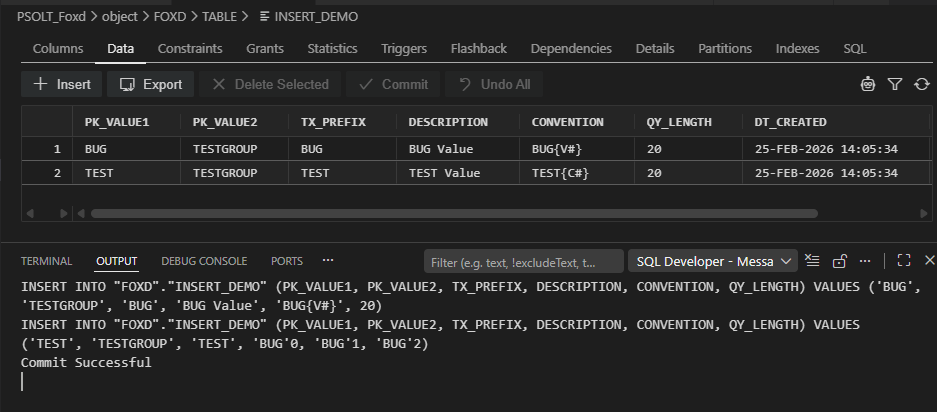
When I open a table using the Table UI and insert multiple rows, the SQL statements that are generated are malformed and do not match the data in the table/provided.
Steps to Reproduce
- Open a table by navigating in the connections window and clicking on the table (single or double).
- In the UI window that appears, click the data tab.
- Click to insert multiple rows. Fill in each row and then click “Commit”
- Check the SQL Developer Output, the SQL statements are generated but do not match the data in the table
DDL Used (Bug_DDL_Setup.sql)
Evidence
Environment
Version: 1.109.5 (user setup)
Commit: 072586267e68ece9a47aa43f8c108e0dcbf44622
Date: 2026-02-19T19:43:32.382Z
Electron: 39.3.0
ElectronBuildId: 13313481
Chromium: 142.0.7444.265
Node.js: 22.21.1
V8: 14.2.231.22-electron.0
OS: Windows_NT x64 10.0.26200
Extension Version: 25.4.1