Hi All:
I am in the process of upgrading from Oracle apex v5.1.2 to v19.2.
In one of my application (HR related), I am using "D3 Bubble Chart" to show many employees in each country.
Currently, I am using "D3 Bubble Chart" plugin for this chart.

Below is the code:
<code>
SELECT
country\_name  ID,

country\_name  LABEL,

country\_name  COLORVALUE,

COUNT(1)      SIZEVALUE,

'f?p=&APP\_ID.:2:&SESSION.:::CIR:IR\_COUNTRY\_NAME,IR\_NOT\_IN\_HEADER\_COUNT:'||country\_name||',N' LINK,

NULL          INFOSTRING
FROM
employee\_info\_v
WHERE
not\_in\_header\_count \= 'N'
GROUP BY
country\_name
</code>
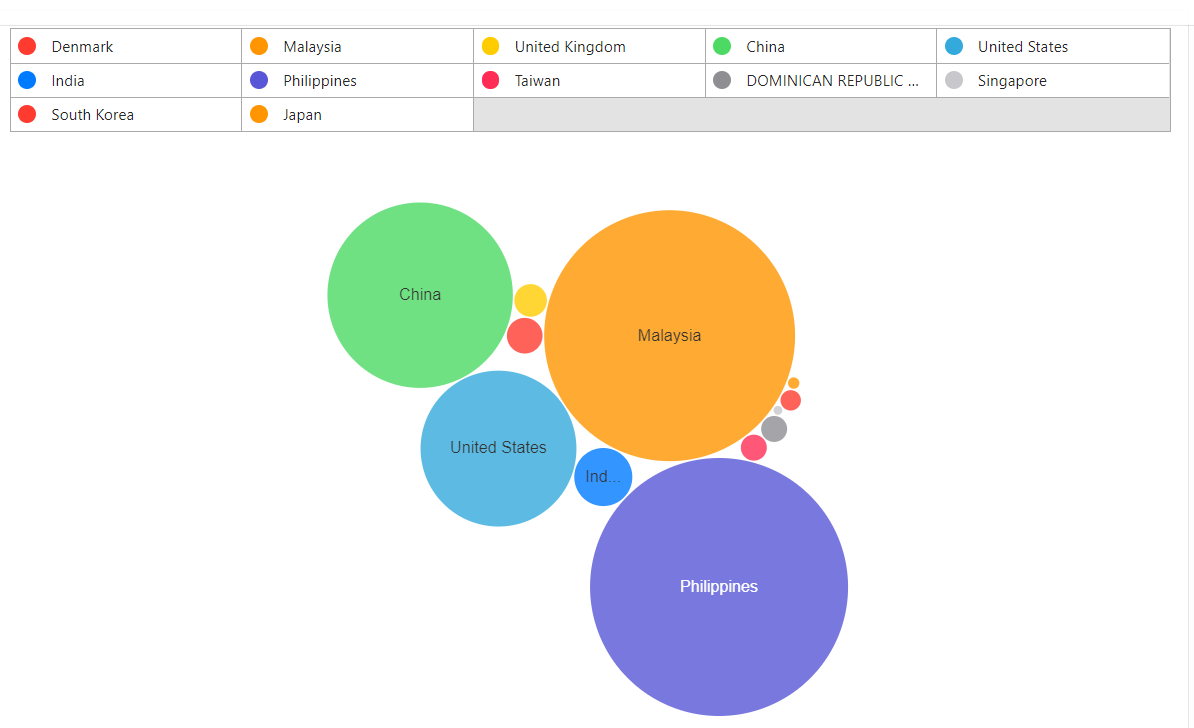
few notes for this chart:
- the bubble doesn't overlap each other (this is very important)
- no need to show/have x/y axes
In my apex 19.2 migration exercise, I'd like to migrate from "D3 Bubble Chart' to "Oracle Jet Bubble Chart".
Below is what I did using "Oracle Jet Bubble Chart":
<code>
SELECT
country\_name  ID,

country\_name  series,

'Group X'     group\_name,

COUNT(1)      x\_value,

COUNT(1)      y\_value,
COUNT(1) z_value,
'f?p=&APP\_ID.:2:&SESSION.:::CIR:IR\_COUNTRY\_NAME,IR\_NOT\_IN\_HEADER\_COUNT:'||country\_name||',N' LINK
FROM
employee_info_v
WHERE
not_in_header_count = 'N'
GROUP BY
country_name
</code>
My JET bubble chart configuration:

Here is the result:

The first problem I see is that "bubble overlap" issue. In my case, it is important to make sure all bubbles are NOT overlapped each other.
Any idea how to achieve this?
You may want me create this thread in "Oracle Jet" forum; however, I'd like to start with apex forum first.
Thanks!
Kevin