I am creating a BI Publisher template in Word. Is there a way to avoid generating extra blank rows in the main template when calling a SubTemplate?
Here is my initial template:

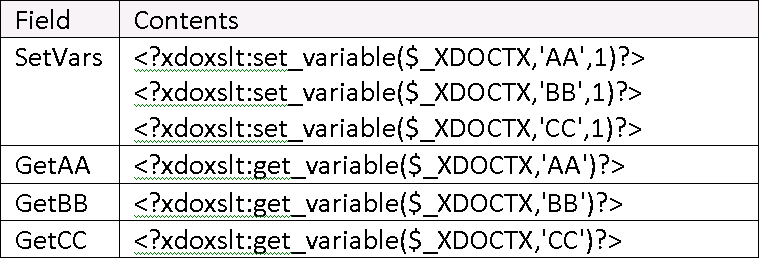
Here are the contents of the fields:
Here is the output - so far, so good:

Now instead of populating the three variables inside of the template, I want to put them into a SubTemplate located at c:\VarTemplate.rtf.
Here is my revised template:

Here are the field contents. Notice the change: the call to the SetVars subtemplate.

Here is the code for the SetVars subtemplate. Notice that it is identical to the code that was initially in the SetVars field in the main template.
<?xdoxslt:set_variable($_XDOCTX,'AA',1)?>
<?xdoxslt:set_variable($_XDOCTX,'BB',1)?>
<?xdoxslt:set_variable($_XDOCTX,'CC',1)?>
Here are the results:

So, performing the exact same actions can generate different results if those actions are performed in a subtemplate vs. in a field in the main template.
So the question: What is the correct syntax for calling a subtemplate (obviously it isn't call@inlines:) so that we avoid generating any extra blank lines? (Note: Removing all carriage returns in the subtemplate would still generate at least 1 extra unwanted row, and is not an option anyway, because the “real” code in the subtemplate is several dozen lines long, and I want the code to be readable, not all jumbled together in one big run-on string.)
Thanks!