So I have a TableView for which I want it to automatically resize its height to be just large enough to display all the rows and not require a vertical scrollbar. This is easy enough if all of the rows are the same height. However, We are using a custom CustomTableCellFactory, and a custom TableCell which is using a Text object to automatically wrap any text that is too long to fit in the cell. I have subclassed TableView and provided a custom Skin so that I could extend the flow class and get access to the row height of each cell. I have a listener tied to the items property in the table to then go and try to find the new size of all the rows via the getFlowPrefHeight() method. However, when this method is called, all the rows are present, but they are still set to their default size, and have their height has not been adjusted for the wrapped text.
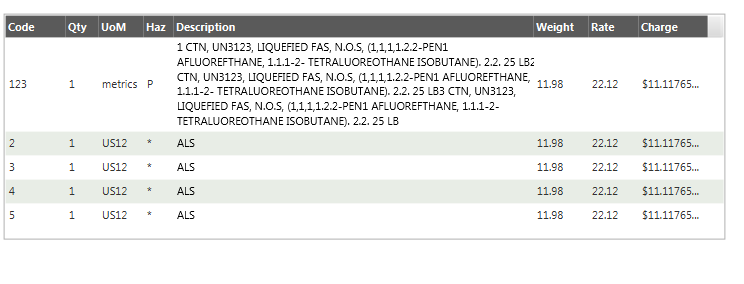
I'm out of ideas on this one, but I'm hoping that I'm missing something obvious. Below is a screenshot of how our table looks (correctly sized), but as soon as rows are added a vertical scrollbar appears. Also below is a snippet of my subclass TableView, skin and virtual flow.
Any help would be greatly greatly appreciated.
Thanks,
-Rob
/*
* To change this license header, choose License Headers in Project Properties.
* To change this template file, choose Tools | Templates
* and open the template in the editor.
*/
package com.lynden.glitter.table;
import com.sun.javafx.scene.control.skin.TableViewSkin;
import com.sun.javafx.scene.control.skin.VirtualFlow;
import java.util.List;
import javafx.application.Platform;
import javafx.beans.property.IntegerProperty;
import javafx.beans.property.SimpleIntegerProperty;
import javafx.beans.value.ChangeListener;
import javafx.collections.ObservableList;
import javafx.scene.control.Skin;
import javafx.scene.control.TableColumn;
import javafx.scene.control.TableView;
public class AutoSizingTableView<T> extends TableView<T> {
private TableViewSkinX\<T> skin;

private IntegerProperty visibleRowCount = new SimpleIntegerProperty(this, "visibleRowCount", 10);

public AutoSizingTableView() {

}

public AutoSizingTableView(ObservableList\<T> items) {

    super(items);

    TableColumn\<T, ?> tc = getColumns().get(3);

}

public void lc() {

    layoutChildren();

}

public IntegerProperty visibleRowCountProperty() {

    return visibleRowCount;

}

@Override

protected Skin\<?> createDefaultSkin() {

    skin = new TableViewSkinX\<T>(this);

    return skin;

}

/\*\*

 \* Skin that respects table's visibleRowCount property.

 \*/

public static class TableViewSkinX\<T> extends TableViewSkin\<T>  {

    public TableViewSkinX(AutoSizingTableView\<T> tableView) {

        super(tableView);

    }

    @Override

    public void updateTableItems(ObservableList\<T> oldList, ObservableList\<T> newList) {

        super.updateTableItems(oldList, newList); //To change body of generated methods, choose Tools | Templates.

        setProperties();

        handleControlPropertyChanged("VISIBLE\_ROW\_COUNT");

    }

    @Override

    protected void handleControlPropertyChanged(String p) {

        super.handleControlPropertyChanged(p);

    }

    /\*\*

     \* Returns the visibleRowCount value of the table.

     \*/

    private int getVisibleRowCount() {

        return ((AutoSizingTableView\<T>) getSkinnable()).getItems().size();

        //return ((AutoSizingTableView\<T>) getSkinnable()).visibleRowCountProperty().get();

    }

    /\*\*

     \* Calculates and returns the pref height of the for the given number of

     \* rows.

     \*

     \* If flow is of type MyFlow, queries the flow directly otherwise

     \* invokes the method.

     \*/

    protected double getFlowPrefHeight(int rows) {

        double height = 0;

        height = ((MyFlow) flow).getPrefLength(rows);

        return height + snappedTopInset() + snappedBottomInset();

    }

    protected void setProperties() {

        double height = computePrefHeight(0, 0, 0, 0, 0);

        getSkinnable().minHeightProperty().set(height);

    }

    @Override

    protected double computeMinHeight(double width, double topInset, double rightInset, double bottomInset, double leftInset) {

        return computePrefHeight(width, topInset, rightInset, bottomInset, leftInset);

    }

    /\*\*

     \* Overridden to compute the sum of the flow height and header

     \* prefHeight.

     \*/

    @Override

    protected double computePrefHeight(double width, double topInset,

            double rightInset, double bottomInset, double leftInset) {

        // super hard-codes to 400 .. doooh

        double prefHeight = getFlowPrefHeight(getVisibleRowCount());

        //double prefHeight = getFlowPrefHeight(25);

        //Add pixels for the header row as well as the horizontal scroll bar.

        return prefHeight + getTableHeaderRow().prefHeight(width) + 10;

    }

    /\*\*

     \* Overridden to return custom flow.

     \*/

    @Override

    protected VirtualFlow createVirtualFlow() {

        return new MyFlow();

    }

    /\*\*

     \* Extended to expose length calculation per a given # of rows.

     \*/

    public static class MyFlow extends VirtualFlow {

        ChangeListener\<Number> listener;

        public MyFlow() {

        }

        protected double getPrefLength(int rowsPerPage) {

            List cells = getCells();

            System.out.println("Cell Count: " + cells.size());

            double sum = 0.0;

            int rows = rowsPerPage; //Math.min(rowsPerPage, getCellCount());

            for (int i = 0; i \< rows; i++) {

                sum += getCellLength(i);

            }

            return sum;

        }

    }

}
}