Hello Everyone,
REDUNDANCY NORMAL == REQUIRES 2 FAILURE GROUPS ( I am clear)
I am trying to create diskgroup with NORMAL REDUNDANCY (just only with 2 raw devices).
From command line ==> i cant create disk group with NORMAL REDUNDANCY
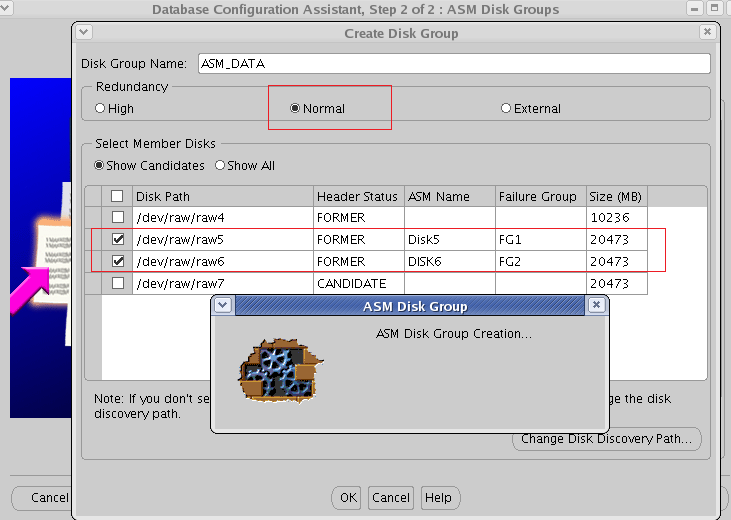
Through DBCA ==> i can.
select GROUP_NUMBER, name, ALLOCATION_UNIT_SIZE AU_SZ, STATE, TYPE, TOTAL_MB, FREE_MB, OFFLINE_DISKS from v$asm_diskgroup;
GROUP_NUMBER NAME AU_SZ STATE TYPE TOTAL_MB FREE_MB OFFLINE_DISKS
------------ ------------------------------ ---------- ----------- ------ ---------- ---------- -------------
       1 ASM\_DG\_DATA                       1048576 MOUNTED     NORMAL      20472      14142             0

       2 ASM\_DG\_FRA                        1048576 MOUNTED     EXTERN      10236       7143             0
SQL> create diskgroup DATA NORMAL REDUNDANCY
2 failgroup disk1 Disk
3 '/dev/raw/raw5' name data1,
4 '/dev/raw/raw6' name data2;
create diskgroup DATA NORMAL REDUNDANCY
*
ERROR at line 1:
ORA-15018: diskgroup cannot be created
ORA-15072: command requires at least 2 failure groups, discovered only 1
But through dbca , i can create diskgroup only with 2 disks
SQL> select GROUP_NUMBER, name, ALLOCATION_UNIT_SIZE AU_SZ, STATE, TYPE, TOTAL_MB, FREE_MB, OFFLINE_DISKS from v$asm_diskgroup;
GROUP_NUMBER NAME AU_SZ STATE TYPE TOTAL_MB FREE_MB OFFLINE_DISKS
------------ ------------------------------ ---------- ----------- ------ ---------- ---------- -------------
       1 ASM\_DG\_DATA                       1048576 MOUNTED     NORMAL      20472      14142             0

       2 ASM\_DG\_FRA                        1048576 MOUNTED     EXTERN      10236       7143             0

       3 ASM\_DATA                          1048576 MOUNTED     NORMAL      40946      40844             0
SQL> select a.disk_number, b.group_number, a.path, b.name, b.type from v$asm_disk a, v$asm_diskgroup b
where a.group_number=b.group_number;
DISK_NUMBER GROUP_NUMBER PATH NAME TYPE
----------- ------------ ---------------------- ------------------------------ ------
      0            3 /dev/raw/raw6          ASM\_DATA                       NORMAL

      1            3 /dev/raw/raw5          ASM\_DATA                       NORMAL

      0            2 /dev/raw/raw3          ASM\_DG\_FRA                     EXTERN

      1            1 /dev/raw/raw2          ASM\_DG\_DATA                    NORMAL

      0            1 /dev/raw/raw1          ASM\_DG\_DATA                    NORMAL
...
..
My confusion/question is , just only 2 disks ,
i can create a diskgroup (redundancy = normal ) through DBCA , but similar operation cannot perform through command-line.
DB Version : 10.2.0.5 on RHEL