Hi Team,
I'm trying to insert XLSX data to oracle tables. Used apex_data_parser through the link "https://blogs.oracle.com/apex/super-easy-csv-xlsx-json-or-xml-parsing-about-the-apex_data_parser-package ". But I can't able to insert the records into tables.
Apex Process:
declare
l\_row\_1 sample\_demo\_1%rowtype;

l\_row\_2 sample\_demo\_2%rowtype;

l\_blob BLOB;
begin
if :P2_SHEETS = 'sheet1.xml' then
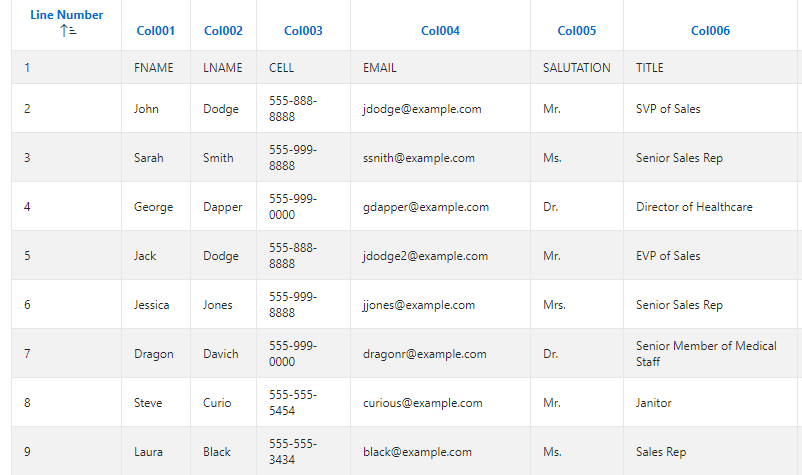
insert into sample_demo_1 (id,first_name,last_name,phone,email,salutation,title)
(
    select line\_number, col001, col002, col003, col004, col005,

                        col006

      from apex\_application\_temp\_files f,

           table( apex\_data\_parser.parse(

                      p\_content                     => f.blob\_content,

                      p\_skip\_rows                   => 1,

                      p\_xlsx\_sheet\_name             => :P2\_SHEETS,

                      p\_file\_type                   => apex\_data\_parser.c\_file\_type\_xlsx,

                      p\_store\_profile\_to\_collection => 'FILE\_PARSER\_COLLECTION',

                      p\_file\_name                   => f.filename ) ) p

     where f.name = :P2\_UPLOAD

);

elsif :P2\_SHEETS = 'sheet2.xml' then

insert into sample\_demo\_2 (id,first\_name,last\_name,phone,email,salutation,title)
(
    select line\_number, col001, col002, col003, col004, col005,

                        col006

      from apex\_application\_temp\_files f,

           table( apex\_data\_parser.parse(

                      p\_content                     => f.blob\_content,

                      p\_skip\_rows                   => 1,

                      p\_xlsx\_sheet\_name             => :P2\_SHEETS,

                      p\_file\_type                   => apex\_data\_parser.c\_file\_type\_xlsx,

                      p\_store\_profile\_to\_collection => 'FILE\_PARSER\_COLLECTION',

                      p\_file\_name                   => f.filename ) ) p

     where f.name = :P2\_UPLOAD

);

end if;
end;
When Button Pressed - SUBMIT
Note:
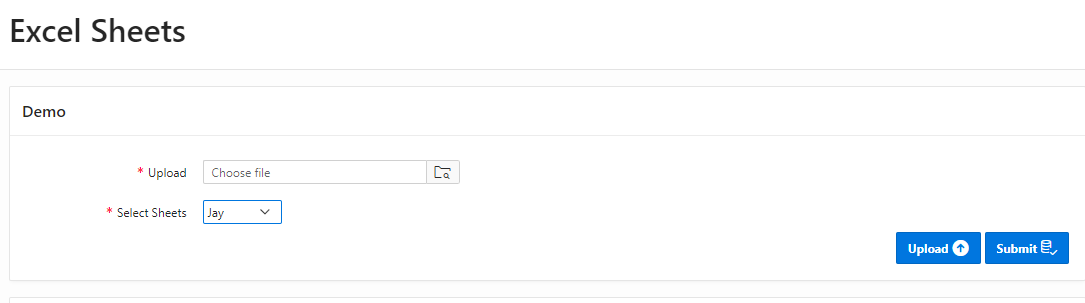
P2_Upload - File Browse Item
P2_Sheets - Sheet Name [ Values taken from Apex Session ]
Apex Version : 19.1
Please provide your valuable inputs.
Thanks,
Robin.