Hi,
I'm trying to open a modal dialog (page 200) from a custom button in an Interactive Grid toolbar using JavaScript Initialization Code. Despite page 200 being properly configured as a modal dialog, I keep getting this error:
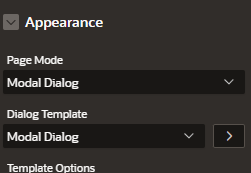
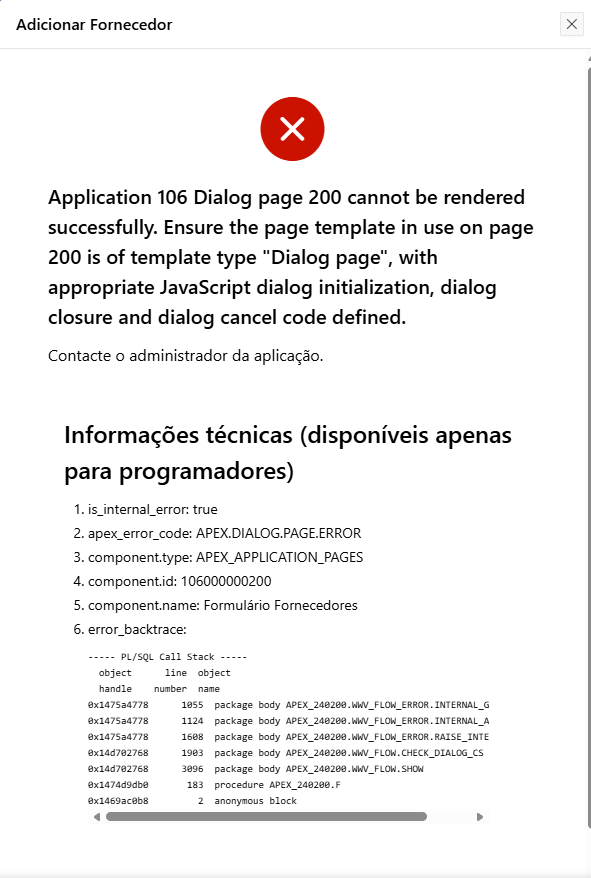
This is the Interactive Grid JavaScript Initialization Code:
function(config) {
var $ = apex.jQuery;
var toolbarData = $.apex.interactiveGrid.copyDefaultToolbar();
var toolbarGroup = toolbarData.toolbarFind("actions3");
let restoreLabel = "Fornecedor ausente da lista? Clique aqui.";
toolbarGroup.controls.push({
type: "BUTTON",
action: "cust-redirect-page",
label: restoreLabel,
iconBeforeLabel: true,
icon: "fa fa-plus",
hot: true
});
config.initActions = function(actions) {
actions.add({
name: "cust-redirect-page",
action: function() {
var url = "f?p=" + apex.env.APP_ID + ":200:" + apex.env.APP_SESSION + ":::::";
apex.navigation.dialog(url, {
title: "Adicionar Fornecedor",
height: "auto",
width: "600"
}, "a");
}
});
};
config.toolbarData = toolbarData;
return config;
}
Questions:
- Is there something different required when opening modals from IG toolbar actions?
- Are there additional configuration steps needed for the Modal Dialog template when called programmatically from IG?
Any insights would be greatly appreciated!
Thanks.