Hi, i was trying to replicate the Page 124 of the Sample Maps demo into my application.
The first thing i noticed was that when i click on the map, the pointer was way off the point i've clicked. I checked on the demo page, it's working without any problem.
I've tried to narrow down the issue but i can't see any error in my code as was a perfect copy of the Sample Maps page.
I think the problem is when i use the mdsys.sdo_util.from_geojson function. I've tried to modify the click position example from:
select 0 as id, mdsys.sdo_util.from_geojson( :P124_CLICK_POSITION ) as geometry
from sys.dual
where :P124_CLICK_POSITION is not null
to
select 0 as id, :P42_CLICK_POSITION as geometry
from sys.dual
where :P42_CLICK_POSITION is not null
Anche changing the column type to geoJSON and it's working corrctley and the pointer get positioned where i clicked on the map.
Now, in the Edge Developer console, if i check the returned map{} json, i see that in my application (where language is set to italian) i have this points (using sdo_util):
[
    {
        "geometry": {
            "type": "Point",
            "coordinates": [
                11,
                44
            ]
        },
        "id": "0",
        "columns": {}
    }
]
As you can see, the coordinates in the browser get completely stripped the part after the dot.
Now, if i use geoJSON directly as column type and remove the sdo_util function:
[
  {
    "geometry": {
      "type": "Point",
      "coordinates": [
        11.887977215882586,
        44.084837440322275
      ]
    },
    "id": "0",
    "columns": {}
  }
]
The part after the dot was manteined.
I've tried to add a page - before regions process with an alter statement becouse i've noticed that the only difference between my application and the Sample Demo Maps was the Application Language:
BEGIN
EXECUTE IMMEDIATE
'alter session set nls_numeric_characters= ''. '' ';
END;
But the problem does not goes away.
Here an image for reference:
Blue pointer → made with geoJSON colum: is correctly palced where i clicked
Green Pointer → made with mdsys.sdo_util.from_geojson
Circle → made with mdsys.sdo_util.from_geojson suffer the same problem: coordinates get stripped
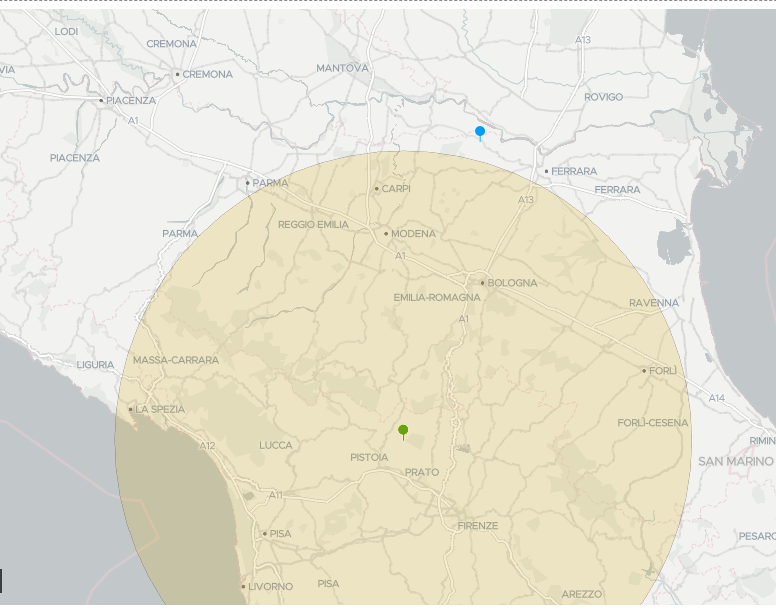
For the circle:
I see in the json that the center problem of the circle have an offset due the the fact the the first coordinate in the array and the latest get stripped but not the middle ones:

Dont mind the .000000001, i'm trying to get it right via javascript without any luck. Without my JS modification, the originale json has 9 (integer)
Any help is appreciated.