@@@@@@@Hi ,
I am just extensing the Oracle Three Column Layout Template which comes out of box for my Application Menu page.
I wanted to have a scroll on the page re-sizing.
So I surrounded the center facet with a af:panelGroupLayout
Now i am encouterting an issue in term of page rendering . Depending on the number of rows returned in the adf table it renders the length of that facet.
It may be because we have added a scroll to the middle (which include Start , Centre and End facet).
Anything which does not fit into the specified region of the browser will bring a scroll which is fine.
But it should not makes the region small and show empty space in the pages
Please find some images for references.
Image below: Fig: 1
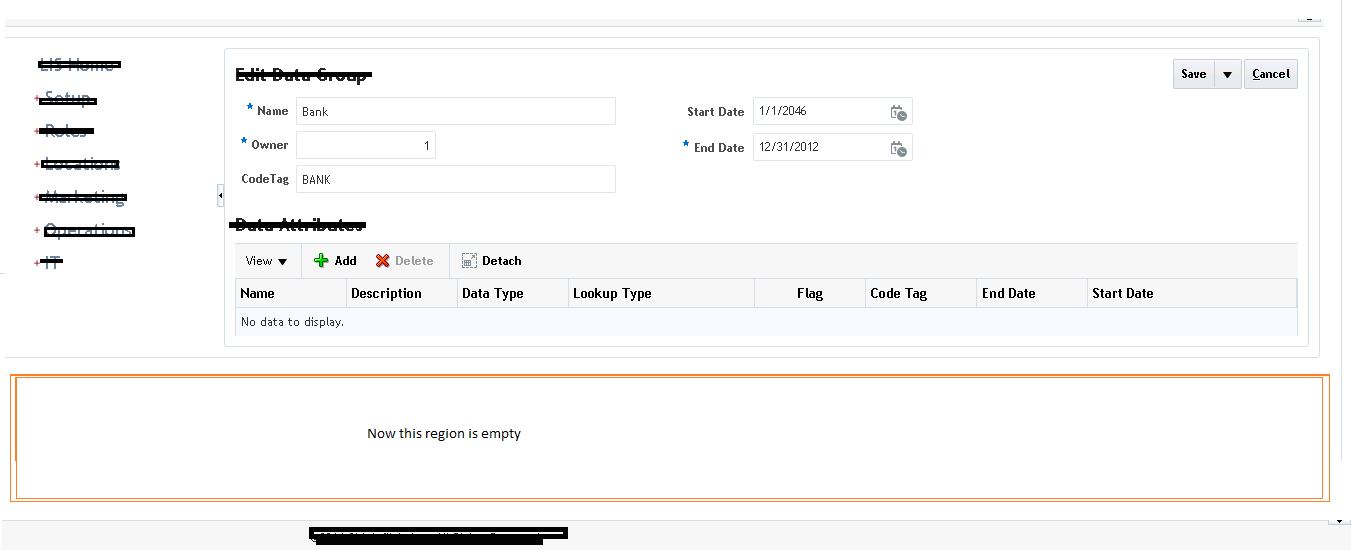
Fig: 1
And when on a different page when data is returned, it displays nicely.
And when on re-sizing also bring a scroll.
Image below: Fig: 2
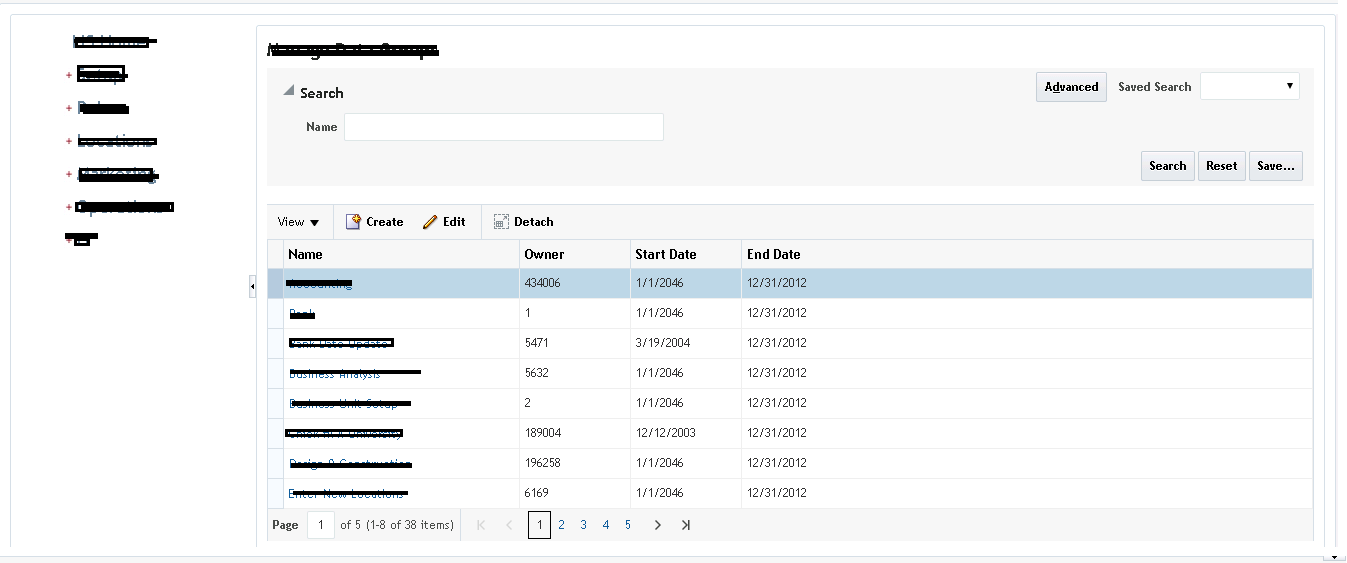
Fig : 2
Template code: This is just a portion of the code. For code is just a replica of Oracle 3 column Layout Template.
| Header 1 |
|
<af:panelGroupLayout id="pt_pgl4" layout="scroll">
                            \<af:decorativeBox id="light" theme="medium" dimensionsFrom="auto" topHeight="50px">

                                \<f:facet name="center">

                                    \<af:panelSplitter id="lightSp" orientation="horizontal"

                                                      splitterPosition="#{attrs.startColumnSize}"

                                                      dimensionsFrom="auto">

                                        \<f:facet name="first">

                                            \<af:facetRef facetName="start"/>

                                        \</f:facet>

                                        \<f:facet name="second">

                                            \<af:panelSplitter id="midSp" orientation="horizontal"

                                                              splitterPosition="#{attrs.endColumnSize}"

                                                              positionedFromEnd="true" dimensionsFrom="auto">

                                                \<f:facet name="first">

                                                    \<af:decorativeBox id="default" theme="default"

                                                                      dimensionsFrom="auto">

                                                        \<f:facet name="center">

                                                            \<af:facetRef facetName="center"/>

                                                        \</f:facet>

                                                    \</af:decorativeBox>

                                                \</f:facet>

                                                \<f:facet name="second">

                                                    \<af:facetRef facetName="end"/>

                                                \</f:facet>

                                            \</af:panelSplitter>

                                        \</f:facet>

                                    \</af:panelSplitter>

                                \</f:facet>

                            \</af:decorativeBox>

                        \</af:panelGroupLayout>
|
How to always render the the whole of the region like shown in Fig : 2 along with the scroll Bar.
Irrespective of whether the table return or not returns any rows.
Please advise.
Thanks
SY